

TL;DR:
- API integrations connect multiple systems to automate data exchange based on defined protocols and authentication methods. They use request-response patterns like HTTP methods, with security, error handling, and operational discipline vital for reliability. Integration platforms (iPaaS) streamline management, reducing complexity, but operational rigor is essential to avoid silent failures over time.
API integrations are the implementation of connecting two or more software systems through their application programming interfaces so they can communicate and exchange data automatically, without manual intervention. The API itself defines the rules, endpoints, and data formats a system exposes. The integration is the code or platform that sends requests, processes responses, and keeps data flowing between systems. Tools like Stripe for payments, Twilio for messaging, and Slack for notifications have made API integrations the default architecture for modern enterprise software. Understanding how they work, where they break, and how to secure them is no longer optional for IT decision-makers.

What are API integrations and how do they work?
API integration connects systems by following a request/response pattern built on HTTP. One system acts as the client and sends a request to a specific endpoint, which is simply a URL representing a resource or action on the target system. The server processes that request and returns a response containing a status code and a body with the requested data or a confirmation of the action taken.
Every request uses an HTTP method to signal intent:
- GET retrieves data without modifying anything on the server.
- POST creates a new resource or triggers an action.
- PUT/PATCH updates an existing resource, either fully or partially.
- DELETE removes a resource from the target system.
Authentication sits at the front of every request. The three most common schemes are API keys (a static token passed in a header), OAuth 2.0 tokens (short-lived credentials issued after an authorization flow), and JWTs (JSON Web Tokens that carry signed claims about the caller). Each scheme has different security profiles, and the right authentication method depends on whether the integration runs machine-to-machine or requires user consent.
Error handling is where most integrations reveal their quality. A well-built integration reads status codes precisely: 200 means success, 400 means the request was malformed, 401 means authentication failed, 429 means the rate limit was hit, and 500 means the server failed. Each code demands a different response from the client, from retrying with backoff to alerting an operator.
Pro Tip: Always log the full request and response pair, including headers and status codes, at the integration layer. When something breaks at 2 a.m., that log is the only record of what actually happened.
What types of API integrations exist and how do they differ?
The architecture of an integration determines its flexibility, latency, and long-term maintainability. Three broad categories cover most enterprise use cases.
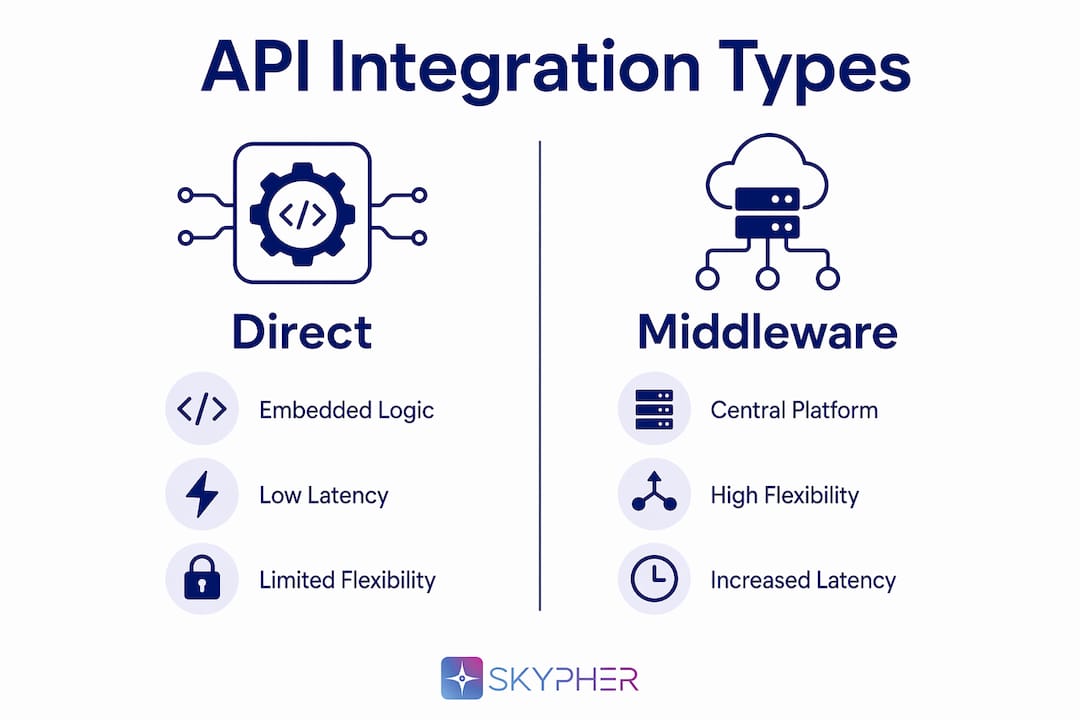
Direct integrations embed the connection logic inside the application itself. The app calls an external API directly, handles authentication, and processes the response. This approach is fast to build for simple cases but creates duplication when multiple services need the same external connection.
Middleware and iPaaS integrations place a centralized platform between systems. Tools in this category orchestrate connectivity, transformations, and retries from a single place, reducing the risk of duplicated logic and inconsistent error handling across services. Enterprise messaging infrastructure built on this model is described in detail by FlowStates.
Hybrid models combine both approaches. A system might use a direct REST API call to send a command and then receive a webhook callback when the operation completes asynchronously. Hybrid strategies combining APIs and webhooks are common in mature systems because they reduce latency for commands while decoupling the producer from the consumer for events.
The table below compares the four most common API architectures:
| Architecture | Interaction style | Best for | Trade-off |
|---|---|---|---|
| REST | Synchronous request/response | CRUD operations, broad compatibility | Overfetching or underfetching data |
| GraphQL | Synchronous, query-driven | Flexible data retrieval, mobile clients | Higher server complexity |
| SOAP | Synchronous, XML-based | Legacy enterprise systems, strict contracts | Verbose, slower to implement |
| Webhooks | Asynchronous, event-driven | Real-time notifications, event pipelines | Requires a public endpoint to receive events |
Pro Tip: Do not default to REST for every integration. If your business workflow is event-driven, a webhook or message queue pattern will reduce coupling and improve reliability far more than polling an endpoint every 30 seconds.
Choosing the right interaction pattern is a business decision as much as a technical one. Teams that align their integration style with their actual workflow requirements avoid significant rework later.
What are the key security considerations for API integrations?
Security in API integrations fails at predictable points. Knowing those points in advance is the difference between a controlled environment and a breach.
The core security principles for any API integration are:
- Least-privilege scopes. Request only the permissions the integration actually needs. An integration that reads invoice data should never hold a token that can delete records. OAuth 2.0 scopes make this granular control possible for both user-delegated and machine-to-machine flows.
- Secure credential storage. API keys and tokens must never appear in source code, environment variable files committed to version control, or application logs. Use a dedicated secret manager such as AWS Secrets Manager, HashiCorp Vault, or Azure Key Vault.
- Token rotation. Short-lived tokens limit the blast radius of a credential leak. Rotate API keys on a defined schedule and revoke them immediately when a team member leaves or a service is decommissioned.
- Transport security. All API traffic must use TLS 1.2 or higher. Unencrypted HTTP is not acceptable for any integration carrying business data.
- Input validation. Validate and sanitize all data received from external APIs before it enters your systems. Malformed or malicious payloads are a real attack vector, not a theoretical one.
For teams managing multiple integrations across different vendors, security review best practices provide a structured approach to auditing credential lifecycles and access scopes at scale. The risk of leaked or expired credentials is not hypothetical. A single exposed API key with broad permissions can give an attacker read access to customer data, billing records, or internal systems within minutes of discovery.
What operational challenges arise after deploying API integrations?
The hardest part of API integration is not the initial build. It is keeping the integration working reliably after deployment, when credentials expire, APIs change their response formats, and traffic spikes arrive without warning. This is where most integration failures actually occur.
The most common post-deployment problems include:
- Expiring credentials. OAuth tokens and API keys have lifespans. When they expire without automated renewal, hundreds of sync jobs can fail silently, corrupting data pipelines before anyone notices.
- API contract changes. A vendor adds a required field, renames a property, or changes a date format. Your integration, which was built against the old contract, starts returning errors or silently dropping data.
- Workload spikes. A sudden increase in transaction volume can push your integration past a vendor's rate limit, triggering 429 errors and backing up queues.
Three patterns address these problems directly. First, idempotency and safe retries prevent duplicate side effects when a request is retried after a timeout. An idempotency key tells the server that a repeated request is the same operation, not a new one. Second, exponential backoff with jitter spaces out retries so a spike of failures does not immediately generate a second spike of retry traffic. Third, dead letter queues (DLQs) capture messages that have failed all retry attempts so they can be inspected and replayed without data loss.
Observability is the operational layer that makes all of this manageable. Assign a correlation ID to every request and propagate it through every downstream call. When a failure occurs, that ID lets you trace the exact path of a transaction across multiple systems in seconds rather than hours.
Pro Tip: Treat API specifications as formal contracts with versioning. When a producer changes an API, the change should go through a versioning process that gives consumers time to adapt. Teams that skip this step discover the cost of it the first time a silent breaking change takes down a production integration.
Managing SaaS security standards across multiple integrated platforms adds another layer of complexity, particularly for organizations in regulated industries where audit trails and access reviews are mandatory.
How do integration platforms and no-code tools simplify the process?
Integration platform as a service (iPaaS) is the category of software that centralizes the logic for connecting multiple systems. Instead of each application managing its own authentication, retry logic, and data transformation, an iPaaS platform handles those concerns once and applies them consistently across every connection.
Pre-built connectors and centralized logic reduce integration sprawl and standardize how authentication and data transformations are handled across an organization. The practical benefits for IT teams are significant:
- A single place to rotate credentials across all integrations, rather than updating secrets in dozens of individual services.
- Pre-built connectors for common platforms that already handle API quirks, pagination, and rate limiting.
- Visual workflow builders that let operations teams modify integration logic without writing code.
- Centralized logging and alerting that gives visibility across all connections from one dashboard.
No-code and low-code tools in this space cover the majority of standard integration scenarios. Custom code remains necessary when an integration requires complex business logic, a vendor API is not supported by the platform, or performance requirements exceed what a managed platform can deliver. The decision between iPaaS and custom code is not ideological. It is a question of how much of your engineering capacity you want to spend on integration plumbing versus product features.
Key takeaways
API integrations succeed when they are built for operational reliability from the start, not treated as a one-time coding task.
| Point | Details |
|---|---|
| API integration definition | An API integration connects two or more systems so they exchange data automatically via defined endpoints and authentication. |
| Security is non-negotiable | Use least-privilege OAuth scopes, rotate credentials on a schedule, and store secrets in a dedicated secret manager. |
| Match pattern to workflow | Choose synchronous REST for commands and asynchronous webhooks for events rather than defaulting to one approach. |
| Build for failure | Implement idempotency keys, exponential backoff, and dead letter queues before a production incident forces you to. |
| iPaaS reduces complexity | Middleware platforms centralize authentication, retries, and logging, freeing engineering teams to focus on product work. |
Why operational discipline separates good integrations from broken ones
I have reviewed a lot of integration architectures over the years, and the pattern that causes the most damage is always the same: a team builds a working integration, ships it, and then treats it as done. The initial connection works. The demo looks clean. Then, three months later, a vendor quietly changes a field name in their API response, and the integration starts dropping data without raising a single alert.
The uncomfortable truth is that most integration failures are not technical failures. They are process failures. The code was fine. The monitoring was not there. The API contract had no versioning agreement. The credential rotation was manual and got skipped during a busy quarter.
My recommendation is to treat every integration as a live service with its own runbook, not a script that runs in the background. Define who owns it, what its SLA is, how credentials are rotated, and what happens when the upstream API changes. That discipline is what separates integrations that run for years from ones that silently corrupt data until a customer complaint surfaces the problem.
For organizations managing security questionnaires and vendor risk, this operational rigor extends to every third-party connection in your stack. The integrations you build with risk management platforms carry the same failure modes as any other API connection, and they deserve the same level of observability and credential hygiene.
— Gaspard
How Skypher handles API integration complexity for security teams

Security questionnaire workflows depend on reliable API connections to third-party risk management platforms, and that is exactly where Skypher is built to operate. Skypher's AI Questionnaire Automation Tool connects to over 40 TPRM platforms including OneTrust and ServiceNow, handling authentication, data transformation, and response delivery without manual configuration for each vendor. The platform integrates with Slack, Microsoft Teams, Confluence, Google Drive, and SharePoint, so your team works inside the tools they already use. Skypher's AI-powered recommendation engine applies the same operational discipline described in this article, with credential management, real-time collaboration, and multilingual support built in from day one.
FAQ
What is the API integration definition in simple terms?
An API integration is a connection between two software systems that allows them to share data automatically using defined rules and endpoints. One system sends a request, the other processes it and returns a response, with no manual data transfer required.
How do API integrations work at a technical level?
A client system sends an HTTP request with an authentication credential to a specific endpoint on the target API. The server validates the request, processes it, and returns a status code plus a data payload that the client then uses or stores.
What are the most common types of API integrations?
The four most common types are REST, GraphQL, SOAP, and webhook integrations. REST is the most widely used for general-purpose connections, while webhooks handle event-driven notifications where real-time updates are required.
What are the biggest risks in API integrations?
Expired credentials, undocumented API changes, and missing retry logic are the three most common causes of integration failure after deployment. Implementing token rotation, contract versioning, and idempotent retries addresses all three directly.
When should an IT team use an iPaaS platform instead of custom code?
Use an iPaaS platform when the integration involves standard data flows between supported systems and your team's capacity is better spent on product work. Custom code is justified when business logic is complex, the vendor API is unsupported, or performance requirements exceed what a managed platform can deliver.