

TL;DR:
- Most enterprise support involves proactive, strategic management beyond simple break-fix services, significantly reducing costly downtime. It includes 24/7 monitoring, dedicated account managers, and AI-powered diagnostics to prevent incidents before they occur. Active engagement and leveraging included advisory services maximize ROI and enhance organizational resilience.
Most IT managers think of enterprise support as a glorified helpdesk. Call when something breaks, wait for a technician, get it fixed, and move on. That framing is both common and expensive. Downtime costs organizations an average of $5,600 per minute in lost revenue and productivity. Enterprise support, done right, is not a reactive safety net. It is a structured program designed to prevent those minutes from ever happening.
Table of Contents
- Key Takeaways
- What enterprise support actually means
- Types of enterprise support models
- Benefits of enterprise support at scale
- How enterprise support works in practice
- AI and the future of enterprise support
- My honest take on enterprise support
- How Skypher fits into your enterprise support strategy
- FAQ
Key Takeaways
| Point | Details |
|---|---|
| Beyond break-fix | Enterprise support covers 24/7 monitoring, strategic guidance, and preventive maintenance, not just incident response. |
| Proactive TAM engagement | Organizations that engage Technical Account Managers for workshops and reviews extract significantly more value from their contracts. |
| Downtime costs are massive | At $5,600 per minute, even a single prevented outage can justify a year's worth of enterprise support investment. |
| AI is reshaping support | Task-specific AI agents are being embedded in support workflows, accelerating diagnostics and reducing resolution times. |
| Contract scope matters | Most enterprise support agreements exclude installation, configuration, and migration work, which require separate professional services. |
What enterprise support actually means
Enterprise support is a structured, multi-layered IT assistance program built specifically for business-critical systems at scale. It goes well beyond answering tickets. The core of any serious enterprise support program includes continuous 24/7 monitoring, defined incident response processes, preventive maintenance cycles, and strategic guidance from specialists who understand your architecture.
The distinction between enterprise support and standard support tiers comes down to accountability and access. Standard support gives you a knowledge base, a ticketing queue, and response times measured in days. Enterprise support services give you named contacts, response times measured in minutes, and engineers who already know your environment before a crisis hits.
What does that look like in practice? Consider these core components typically bundled into enterprise support plans:
- Technical Account Managers (TAMs): Dedicated specialists who learn your environment, track your open issues, and coordinate internally on your behalf.
- 24/7 proactive monitoring: Continuous system health checks that catch anomalies before they become outages.
- AI-powered diagnostics: Automated analysis tools that correlate symptoms across systems to surface root causes faster.
- Performance optimization reviews: Periodic assessments that identify architectural inefficiencies before they compound.
- Security and compliance guidance: Ongoing advice on hardening configurations and meeting regulatory requirements.
Pro Tip: When evaluating enterprise support services, ask vendors specifically what your TAM's caseload looks like. A TAM managing 80 accounts is a shared resource. A TAM managing 10 accounts is an actual strategic partner.
Types of enterprise support models
The market offers more variation in enterprise support models than most buyers realize. Understanding the differences helps you match the right model to your actual risk profile rather than defaulting to the most expensive tier available.
Reactive vs. proactive support
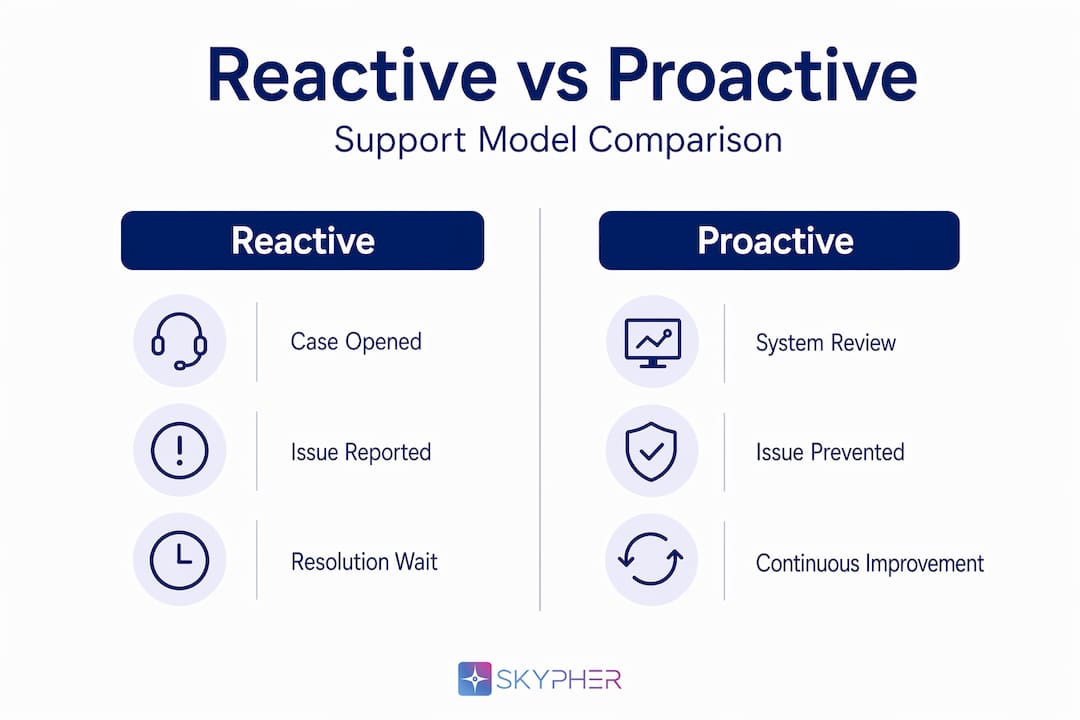
Reactive support is what most organizations have experienced. You open a case, describe the problem, and wait for resolution. It is necessary, but it is the floor of enterprise support, not the ceiling.
Proactive support flips the model. Instead of waiting for incidents, your support team runs architectural reviews, conducts performance workshops, and runs simulated failure scenarios, sometimes called gamedays, to stress-test your environment before real failures expose gaps. Proactive TAM engagement with workshops, architectural reviews, and simulations consistently produces better outcomes than organizations relying solely on reactive incident response.
Common enterprise support tiers in the market
Here is how several major vendors structure their enterprise support offerings:
| Vendor | Tier Name | Key Features |
|---|---|---|
| AWS | Enterprise Support | 15-minute response SLA, dedicated TAM, AI diagnostics, operations reviews |
| SAP | Enterprise Support | 22% of net license value, self-service tooling, maintenance roadmap access |
| Tenable | Dedicated Elite | Named full-time engineer, 24/7 coverage, proactive case management |
| Microsoft | Unified Support | Designated Support Engineer, proactive services, cloud and on-premises coverage |
- Define your criticality threshold. Identify which systems, if down for 30 minutes, would cause material business harm.
- Map that to SLA requirements. Does your risk exposure justify a 15-minute response tier, or would a 4-hour SLA suffice?
- Evaluate TAM access models. Understand whether your designated contact is truly dedicated or shared across a large portfolio.
- Assess proactive service inclusions. Workshops, reviews, and health checks vary significantly between vendors and tiers.
- Review automation capabilities. Vendors are actively embedding AI diagnostics into support workflows. Understand what is actually in production versus marketed as a roadmap feature.
Pro Tip: Request a sample Operational Review report from your vendor before signing. That document shows you whether their strategic guidance is substantive or just a repackaged dashboard printout.
Benefits of enterprise support at scale
The clearest benefit of enterprise support is financial risk reduction. When downtime costs $5,600 per minute, an annual enterprise support contract that prevents even two major outages per year pays for itself. But the financial case is not limited to avoided downtime.
"Enterprise support is evolving into a strategic anchor allowing organizations to modernize technology lifecycles on their terms rather than vendor mandates." — Forrester on enterprise support strategy
The operational benefits of enterprise support compound over time. TAMs who understand your environment accumulate institutional knowledge that accelerates every future engagement. Security guidance built into your support contract means compliance work gets embedded into normal operations rather than treated as a separate project sprint.
That said, the benefits of enterprise support are not automatic. SAP Enterprise Support at 22% of license value is difficult to justify if your team never engages the included service credits, workshops, or advisory sessions. The ROI depends almost entirely on how actively your organization uses what is available.
Here is a direct comparison of outcomes between passive and active enterprise support engagement:
| Engagement Style | Typical Outcomes |
|---|---|
| Passive (reactive only) | Slower resolution, underused service credits, higher total downtime |
| Active (proactive + reactive) | Faster incident resolution, optimized architecture, measurable compliance improvements |
For organizations with mission-critical, global environments, 24/7 enterprise support is clearly justified. For simpler, stable environments, the premium tier may genuinely lack ROI. The key is honest assessment of your criticality, not vendor upselling.
How enterprise support works in practice
Understanding how enterprise support works operationally helps you set up your internal processes to get full value from it.
Most engagement starts through a vendor support portal where your team opens cases, tracks status, and uploads diagnostic data. For critical issues, escalation paths bypass standard queues and connect you directly to senior engineers within minutes. Your TAM typically sits outside that queue entirely, acting as an internal advocate who coordinates cross-team resources on your behalf.

The strategic layer of how enterprise support works runs on a quarterly or monthly cadence. Your TAM schedules operational reviews, proposes workshops relevant to your upcoming projects, and flags proactive recommendations based on patterns they observe across your case history. This is where proactive enterprise support separates itself from every other tier.
Enterprise support is also expanding beyond traditional IT boundaries. Enterprise Service Management now positions support desks as organizational backbones managing service requests across HR, legal, finance, and facilities, not just technology stacks. Your IT support infrastructure can become the central coordination layer for the entire organization.
A few things to watch carefully in any enterprise support contract:
- Exclusions: Most agreements exclude installation, configuration, and migration work. These require separate professional services agreements and should be budgeted separately.
- Service credit expiration: Many vendors bundle advisory hours or training credits that expire if unused. Track these actively.
- Escalation authority: Confirm whether your TAM can directly escalate to engineering leadership or only to another support tier.
- Coverage boundaries: Understand exactly which products, versions, and environments fall inside your contract scope.
Pro Tip: Schedule your first TAM meeting before you have any incidents. Use that time to document your environment, discuss upcoming projects, and establish the escalation contacts on both sides. Organizations that wait until a crisis to engage their TAM waste months of relationship-building time.
AI and the future of enterprise support
The support model is changing faster than most procurement cycles can track. By end of 2026, 40% of enterprise applications will include task-specific AI agents, fundamentally transforming how support is delivered and automated.
In practice, that means AI is already being embedded into diagnostics, monitoring, and first-response workflows at major vendors. Rather than a human engineer running through a troubleshooting checklist, an AI agent correlates telemetry across thousands of data points and surfaces a prioritized hypothesis within seconds. The human expert then validates and acts, rather than starting from scratch.
The AI advantages in cybersecurity automation are particularly relevant here. Security questionnaire responses, compliance evidence gathering, and risk assessment workflows are all areas where AI is reducing the hours your team spends on manual coordination, directly complementing what your enterprise support contract covers.
Here is where AI is currently making the most measurable difference in enterprise support workflows:
| AI Application | Impact |
|---|---|
| Automated anomaly detection | Catches issues before users report them, reducing mean time to detection |
| Intelligent case routing | Matches tickets to engineers with the right expertise faster |
| Predictive maintenance | Surfaces optimization recommendations before performance degrades |
| Automated compliance checks | Continuously validates configurations against security baselines |
Support automation is not replacing human expertise. It is eliminating the repetitive diagnostic work that previously consumed expert time. The best enterprise support programs today combine AI-accelerated workflows with experienced engineers who handle judgment-intensive decisions.
My honest take on enterprise support
I've watched organizations spend six figures annually on enterprise support contracts and extract almost nothing from them. Not because the contracts were bad. Because the internal teams treated support as a break-fix phone number rather than a strategic resource.
In my experience, the single biggest mistake IT leaders make is evaluating enterprise support purely on incident response metrics. Response time matters. But the real ROI comes from the architectural reviews that prevent incidents, the workshops that upskill your team, and the TAM relationships that get you an engineering escalation at 2 a.m. when you actually need one.
I've also seen the opposite. Teams that schedule quarterly reviews with their TAMs, exhaust their included advisory credits, and run proactive gamedays against their most critical systems. Those teams rarely have major outages. When they do, resolution is measured in minutes rather than hours.
My practical advice: treat your TAM like an internal hire. Give them context on your business priorities, your upcoming projects, and your risk tolerance. The more they understand your environment, the more useful every interaction becomes. That relationship compounds in ways that no SLA document can capture.
The uncomfortable truth is that negotiating support fees and documenting the value you extract from critical support incidents is work your team needs to do internally. Vendors are not going to present you with a clean ROI report at renewal time. You have to build that case yourself.
— Gaspard
How Skypher fits into your enterprise support strategy
For IT and security teams managing enterprise support at scale, the administrative burden of security reviews is one of the most underestimated costs. Every vendor questionnaire, every compliance review, every third-party risk assessment pulls your team away from higher-value work.

Skypher's AI Security Questionnaire Automation tool handles that burden directly. It integrates with over 40 third-party risk management platforms, connects with tools your team already uses like Slack and ServiceNow, and can process 200 questions in under a minute using AI models built specifically for security content. For organizations managing complex enterprise environments with multiple products or entities, Skypher's smart security knowledge base maintains a continuously updated repository of verified answers, eliminating the repetitive manual work that consumes security team hours every week.
FAQ
What is enterprise support?
Enterprise support is a structured IT assistance program that provides 24/7 monitoring, dedicated technical contacts, guaranteed response SLAs, and strategic guidance for organizations running business-critical systems. It goes well beyond standard helpdesk tiers by including proactive services and named account management.
How does enterprise support differ from standard support?
Standard support typically offers community resources and ticketed responses measured in hours or days. Enterprise support services include dedicated Technical Account Managers, sub-hour response SLAs for critical issues, and proactive services like architectural reviews and performance workshops.
What are the main benefits of enterprise support?
The primary benefits include reduced downtime risk, faster incident resolution, improved security posture, and access to strategic expertise. Given that downtime costs an average of $5,600 per minute, preventing even a single major outage per year can justify the investment.
What does enterprise support typically exclude?
Most enterprise support contracts exclude installation, configuration, and migration work. These services require separate professional services agreements and should be planned and budgeted independently from your support contract.
How should IT teams maximize their enterprise support ROI?
Engage your Technical Account Manager proactively rather than waiting for incidents. Schedule regular operational reviews, use included advisory credits before they expire, and run proactive workshops aligned to your upcoming infrastructure changes.