

Asana Academy is Asana's official, free learning platform where you can complete on-demand courses, attend live trainings, earn skill badges, and pursue formal certification. All courses are available at no cost to any user with an Asana account. Sign in with your Asana account, browse "All courses," and pick a role-based learning path to get started today.
Your immediate next steps:
- Sign in at academy.asana.com using your existing Asana account
- Browse the full course catalog and filter by role or goal
- Choose a learning path (Asana Foundations is the right starting point for most users)
- Register for a live training session or enroll in a certificate track
Pro Tip: If you're unsure which path to pick, start with Asana Foundations. It covers the core concepts every role needs before branching into Workflow Specialist or Administrator tracks.
Key Takeaways
Asana Academy is free, requires only an Asana account to access, and offers a clear path from beginner courses to formal certification for every role.
| Point | Details |
|---|---|
| Free access for all users | Sign in with any Asana account at academy.asana.com; no paid plan required for most courses. |
| Badges vs. certificates | Badges validate a single skill quickly; certificates require exams or capstones and suit admins and workflow owners. |
| Credential delivery | Digital badges and certificates are typically emailed within 24 hours of successful completion. |
| Live trainings run 45–60 minutes | Sessions like "Getting started" (45 min) and "Managing projects" (60 min) are recorded for on-demand viewing. |
| Team rollout essentials | Pilot with a small group, assign role-based paths, designate an Ambassador, then scale. |
Table of Contents
- What is Asana Academy and who is it for?
- Courses, learning paths, and lessons available in Asana Academy
- Skill badges vs. certificates: which one should you pursue?
- How does the Asana certification process work?
- How do you access Asana Academy, and does it cost anything?
- Live trainings and video tutorials: what to expect
- What is the Asana Ambassador program?
- How should teams use Asana Academy to drive adoption?
- How to prepare for an Asana certification exam
- Why the sequence matters more than the credential itself
- Sources
What is Asana Academy and who is it for?
Asana Academy is Asana's official learning platform, built to help individuals and teams use the product the right way from day one. Its primary purpose is to standardize how organizations implement Asana so teams avoid inconsistent setups, redundant workflows, and the long-term maintenance headaches that come with ad hoc adoption.
The platform serves four main audiences. Beginners and individual contributors use it to get productive quickly. Project managers use it to design workflows, set up reporting, and manage cross-functional projects. Administrators rely on the Administrator certificate path to configure Asana at scale. Learning Ambassadors use it to lead internal adoption and coach colleagues. Whether you're a solo contributor who just joined a team running Asana or an ops lead rolling it out across a 500-person organization, the Academy has a path built for your situation.
Courses, learning paths, and lessons available in Asana Academy
The course catalog organizes content into five top-level areas: Learn Asana, Master Asana, company-wide use cases, marketing use cases, and AI-focused paths. Within those areas, four learning paths carry the most weight for professionals:
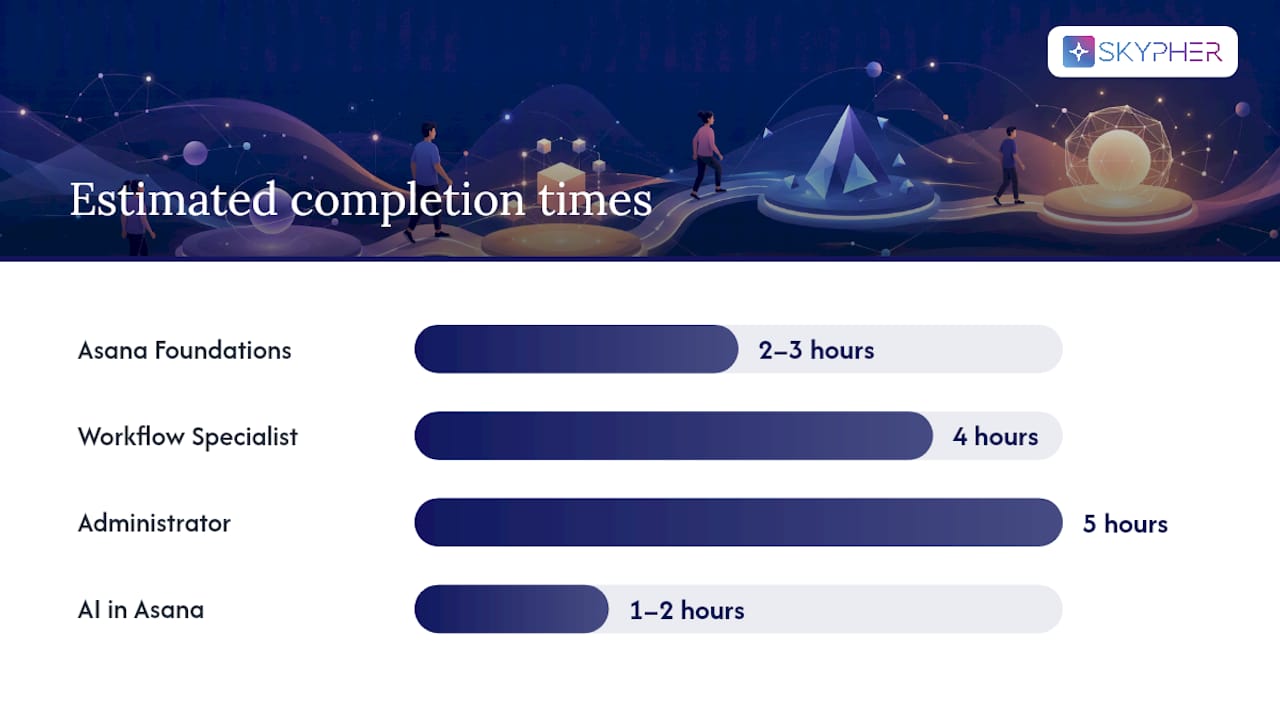
| Learning Path | Target Role | Estimated Time | Includes Exam | Recommended Starting Level |
|---|---|---|---|---|
| Asana Foundations | All users, beginners | 2–3 hours total | No | No prior Asana experience needed |
| Workflow Specialist | Project managers, ops leads | 4 hours total | Yes | Foundations complete |
| Administrator | Asana admins, IT leads | 5 hours total | Yes (capstone) | Foundations + active admin access |
| AI in Asana | All roles, AI-curious users | 1–2 hours total | Badge only | Basic Asana familiarity |
Individual lessons within these paths run 15–60 minutes in self-paced formats. Certificate tracks accumulate to multi-hour totals when you factor in quizzes, worksheets, and capstone work. Courses include step-by-step video lessons, quizzes, and worksheets designed to help you apply what you've learned directly in your Asana workspace.
A few practical notes on access:
- Many courses are available in localized or translated versions; check the course detail page for language options
- Recorded sessions appear in the Academy catalog alongside live training registrations
- Short how-to videos (often under 10 minutes) sit outside the formal paths and are useful for quick reference
Skill badges vs. certificates: which one should you pursue?
The distinction matters more than most users realize. Skill badges are focused, non-expiring credentials that validate a single capability, such as proficiency with Asana's automation rules or AI features. Certificates are broader credentials that require completing multiple courses, passing a formal exam or capstone, and in some cases paying a fee for the certification assessment.
According to Asana's certification guidance, badges are best for quick, targeted skill validation, while certificates are more appropriate for administrators and workflow owners who design and scale processes across teams.
When a skill badge is enough:
- You need to demonstrate one specific capability to a manager or client
- You want to build confidence before committing to a full certificate track
- Your role is individual contributor and you don't manage Asana at the organizational level
When a certificate is worth the investment:
- You're an admin responsible for configuring Asana across a department or company
- You design workflows, templates, or reporting structures others depend on
- You want a credential that carries weight in a job search or internal promotion conversation
The practical sequence most users follow: earn one or two targeted badges first, then use that foundation to move into a certificate track. Badges prepare you for certificate coursework by covering the same concepts at a shallower depth, so the certificate content feels like a natural progression rather than a jump.
One important distinction: Asana Academy credentials are vendor-specific platform credentials. They demonstrate Asana proficiency, not universal project management qualifications like a PMP. For readers who want a broader PM credential to complement their Asana certification, agile project management fundamentals from an independent body is a natural pairing.
How does the Asana certification process work?
The process follows a clear sequence, and knowing it upfront saves you from surprises on exam day.
- Create or confirm your Asana account and sign in to academy.asana.com.
- Enroll in the required courses for your chosen certificate track (the certification page lists prerequisites for each path).
- Complete all lessons, quizzes, and worksheets within the track. Progress is tracked automatically once you're logged in.
- Pass the final assessment or capstone. Exam formats vary by track: some certificate paths include a 90-minute exam; others require a multi-hour capstone submission (up to 3 hours for more advanced tracks).
- Receive your digital badge or certificate by email, typically within 24 hours of the system registering your successful completion.
| Certificate Track | Assessment Format | Approximate Exam Duration |
|---|---|---|
| Workflow Specialist | Final exam | about 90 minutes |
| Administrator | Capstone project + exam | ~3 hours |
Pro Tip: Before sitting the final exam, complete at least one full practice run in a live Asana workspace. Working through a real project, not just watching videos, is what closes the gap between knowing the content and applying it under time pressure.
Digital badges and certificates are delivered by email after completion, per Asana's certification program. If you don't receive the email within 24 hours, check your spam folder first, then contact Asana support with your completion confirmation.
How do you access Asana Academy, and does it cost anything?
Asana Academy is free and available to any user with an active Asana account. You don't need a paid Asana plan to access the majority of courses, learning paths, or skill badges.
Access checklist:
- Go to academy.asana.com and click "Sign in"
- Authenticate with your existing Asana credentials (Google SSO works if your organization uses it)
- Once logged in, your progress is tracked automatically across all enrolled courses
- If you don't have an Asana account, create a free Personal plan first at asana.com
Paid elements may appear within specific certification tracks, particularly for formal exam proctoring or advanced certificate assessments. Check the individual certification page for current fee details before enrolling. Asana's platform plan pricing (Starter, Advanced, Enterprise) is separate from Academy access entirely; you can review Asana's plan pricing for product context, but it has no bearing on whether you can access Academy courses.
If you lose access to a course mid-completion, the most common cause is a lapsed or deactivated Asana account. Reactivating the account restores your progress.
Live trainings and video tutorials: what to expect
Live training sessions run on a regular schedule and typically last 45–60 minutes. Common session examples include "Getting started with Asana" (45 minutes) and "Managing projects in Asana" (60 minutes). AI Studio sessions follow the same format, running approximately 45 to 60 minutes depending on the topic.
What makes live sessions worth attending beyond the recordings is the Q&A component. Instructors field questions in real time, which means you can get a direct answer to a workflow-specific question rather than hunting through documentation. Hands-on demos during live sessions also show edge cases that pre-recorded videos rarely cover.
If you can't attend live, recordings are made available in the Academy catalog after the session. The on-demand version covers the same content, though you lose the live Q&A. A practical approach: watch the recording first to assess whether the topic is relevant, then register for the next live session of that same topic if you have specific questions.
Short how-to videos (under 10 minutes) complement the longer sessions. They're useful for quick reference when you're mid-project and need a fast answer on a specific feature, such as setting up a rule or configuring a custom field.
What is the Asana Ambassador program?
The Asana Ambassador program is a community-based initiative for professionals who want to lead Asana adoption inside their organizations and connect with other Asana champions across the industry. It sits alongside Academy certification rather than replacing it.
Ambassadors focus on advocacy, internal change management, and peer coaching rather than technical certification. The program gives participants access to community resources, networking opportunities with other Asana power users, and leadership materials to help them guide colleagues through adoption. For enterprise teams, this is where the real adoption leverage lives: a certified admin who also functions as an internal Ambassador can translate technical knowledge into organizational behavior change, which is something coursework alone rarely achieves.
Benefits of the Ambassador program:
- Access to a community of Asana practitioners across industries
- Leadership resources for running internal training sessions and workshops
- Networking with other Ambassadors who've solved the same adoption challenges
- A recognized role that complements Academy certificates and badges
To express interest in the Ambassador program, start at the Academy community section. Completing at least one certificate track first is a practical prerequisite, since the program assumes you can already guide others through the platform.
How should teams use Asana Academy to drive adoption?
A structured rollout using Academy resources consistently outperforms an uncoordinated "everyone figure it out" approach. Here's a practical playbook:
- Identify a pilot group of 5–10 users across key roles (at least one PM, one admin, one individual contributor). Assign role-based learning paths before the pilot begins.
- Designate an internal Ambassador from the pilot group. This person completes the Administrator or Workflow Specialist certificate first and becomes the internal point of contact for questions.
- Run the pilot for 3–4 weeks, tracking completion rates and badge counts as adoption signals. Usage metrics inside Asana (task creation rate, rule activations, reporting views) serve as secondary signals.
- Prioritize quick wins aligned with Academy courses: task templates, automated rules, and portfolio reporting. These three features have the highest visible impact on teams new to structured project management.
- Scale to the full team once the pilot group has completed Foundations and at least one role-specific path. Use the Ambassador to run internal Q&A sessions modeled on the live training format.
Pairing Academy coursework with an internal pilot program creates a stronger path to adoption than coursework alone. For teams managing complex workflows, the proof of concept framework is a useful model for structuring the pilot phase before full rollout.
Pro Tip: After your team completes Academy courses, document your internal workflows in a shared Asana project or a connected tool like Confluence or Notion. Academy teaches the platform; your internal documentation captures how your team specifically uses it. That combination is what makes adoption stick.
How to prepare for an Asana certification exam
Preparation works best when it mirrors the exam format. Most candidates who struggle on their first attempt have watched all the videos but haven't built anything in a live workspace.
Recommended study sequence:
- Complete Asana Foundations first, even if you've been using Asana for months. The course often surfaces features and settings you've been underusing.
- Earn one or two skill badges in areas covered by your target certificate (automations, reporting, or admin settings). Badges reinforce the same concepts at a lower stakes level.
- Build a practice project in a real Asana workspace that mirrors a capstone scenario: set up tasks, assign owners, create rules, configure a portfolio, and generate a report.
- Attend at least one live training session in your certificate's topic area for the Q&A access.
Test-day checklist:
- Confirm your login credentials work at academy.asana.com before the exam window opens
- Use a stable internet connection; the exam platform is browser-based
- Allocate the full estimated time (90 minutes for Workflow Specialist, up to 3 hours for Administrator)
- Read each question fully before answering; scenario-based questions often include a detail that changes the correct answer
- Submit before the timer expires; partial submissions may not be scored
For enterprise teams who want to complement Asana credentials with a broader governance framework, pairing with an IT ethics certification is worth considering, particularly for admin roles with access to sensitive project data.
Why the sequence matters more than the credential itself
Most professionals approach Asana Academy the wrong way: they skip Foundations because they've been using the tool for a year, jump straight to a certificate track, and then struggle with exam scenarios that assume you know the platform's underlying logic, not just its surface features.
The sequence — Foundations badge, role-specific badge, then certificate — works because each layer builds the mental model you need for the next. Foundations teaches you how Asana thinks about work. Role-specific badges teach you how your function uses that model. The certificate tests whether you can apply both under realistic constraints.
For teams, the adoption impact of a single certified admin paired with an Ambassador is measurably different from a team where everyone has watched a few videos. The credential creates accountability; the Ambassador role creates culture. Neither works as well without the other.
If you manage workflows, own an Asana instance, or lead a team that depends on consistent project execution, the certificate is worth the time. If you're an individual contributor who needs to demonstrate competence quickly, two or three targeted badges get you there faster and with less friction.
Sources
The pages below are the most direct starting points for everything covered in this article: