

An automated due diligence response system answers the security questionnaires and due diligence questionnaires (DDQs) your customers send, by drafting each answer from your own approved content and routing the uncertain ones to a named human. It is built for the vendor side of the table: the B2B software company that gets a 300-question spreadsheet from a prospect's procurement team and has to answer it without pulling the security team off its real work. Skypher's Questionnaire Automation Tool is built for exactly this job. Its proprietary retrieval AI scores its own confidence on every answer, so your reviewers spend their time on the questions that need them.
This guide covers what such a system does, which steps to automate and which to keep human, how to build the answer library it depends on, how to control accuracy and confidentiality, and how to measure whether it is working.
TL;DR
- An automated response system parses a questionnaire in any format, drafts answers from an approved knowledge base, attaches a confidence score, and sends low-confidence or sensitive items to an owner.
- Automate parsing, matching, drafting, formatting and portal submission. Keep human sign-off on certifications, audit reports, legal terms and anything new.
- The library matters more than the model: every answer needs an owner, a review date and evidence that has not expired.
- Track turnaround time, share of answers accepted without edits, and follow-up questions from the buyer. One practitioner reported turnaround cut by more than 60% after cleaning up approved answers.
- Skypher combines proprietary AI with confidence scoring, 40+ integrations, real-time collaboration and a customizable Trust Center.
Table of Contents
- What an automated due diligence response system actually is
- Which steps to automate and which to keep human
- Build the answer library before you automate
- Controlling accuracy, confidentiality and auditability
- How teams review and approve together
- Integrations and formats the workflow must support
- Implement it and measure the result
- Where Skypher fits
- Our perspective
- FAQ
- Sources
What an automated due diligence response system actually is
"Due diligence" has two directions. Buyers run it on vendors, and vendors answer it. Much of what ranks for this phrase describes the first direction: banks screening customers, KYC and anti-money-laundering alert review, M&A data rooms. If you are a CISO, a GRC lead, a solutions engineer or a sales director at a software company, you sit on the other side. A prospect or an existing customer asks you to prove your security posture, and you reply with a completed questionnaire.
Those questionnaires come in several shapes:
- Standardized frameworks, such as the SIG questionnaire from Shared Assessments, whose question set spans 19 risk domains covering cybersecurity, IT, privacy, data governance and business resiliency.
- Custom spreadsheets written by a customer's security team, often a mix of framework questions and one-off requests.
- Portal-based forms inside a customer's third-party risk management (TPRM) platform, where you answer question by question in a browser.
- DDQs from financial institutions, which add operational, regulatory and fiduciary questions to the security ones. Skypher's DDQ automation is built for these.
A response system sits between those inputs and your internal knowledge. It reads the incoming file, finds the closest approved answer for each question, drafts a reply, tells you how sure it is, and keeps a record of what was sent. The work stays the same, only the share done by hand drops.
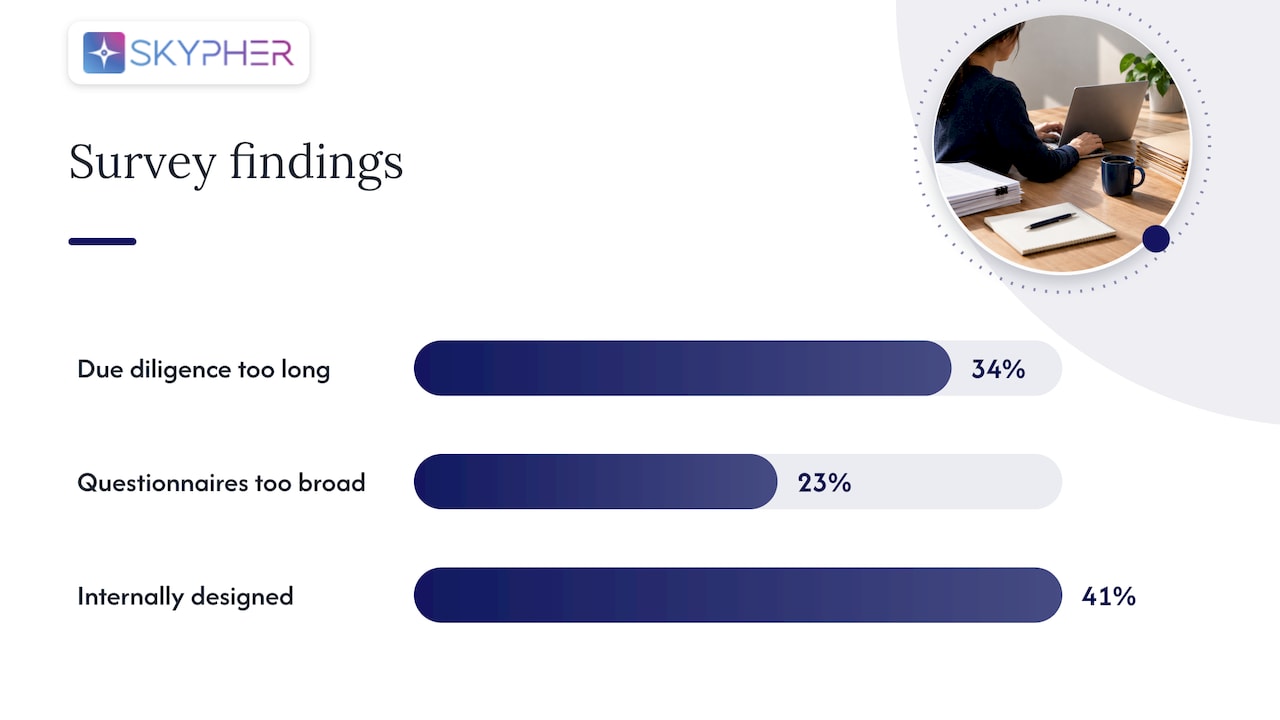
The reason this matters is volume. In the ACA Group and NSCP 2024 benchmarking survey of investment advisers, 34% of firms said vendor due diligence took too long and 23% said questionnaires were too broad or lengthy. The same survey found 41% of firms used an internally designed questionnaire, which is why you cannot count on receiving a familiar format. Your response process has to cope with whatever arrives.
Which steps to automate and which to keep human
The useful split is not "AI versus people". It is mechanical work versus judgment. The table below shows where we draw the line.
| Step | Automate? | Why |
|---|---|---|
| Intake and parsing of the file (Excel, Word, PDF, portal) | Yes | Pure formatting work; errors here are easy to see |
| Matching each question to your approved answers | Yes | Retrieval from a knowledge base is what the AI does best |
| Drafting the answer and attaching a confidence score | Yes | Gives reviewers a queue sorted by risk |
| Routing to the right owner (IAM, encryption, incident response) | Yes | Rules by topic remove the "who knows this?" thread |
| Reviewing low-confidence and new answers | No, human | A person must own anything not already approved |
| Claims about certifications, audit reports, uptime, subprocessors, insurance, legal terms | No, human | These create contractual exposure |
| Releasing evidence under NDA or summary-only | No, human | Depends on the recipient and the paper you have signed |
| Formatting and submitting back to the file or portal | Yes | Mechanical |
| Final send | Human | One accountable person approves the package |
Two points about this split deserve emphasis.
First, a human being present is not the same as a human being effective. The SAFER AI Protocol, published in Springer's Discover Artificial Intelligence, argues that the reviewer must be competent and empowered to change the outcome, not merely listed on the form. In practice, route the encryption questions to whoever runs encryption, not to whoever has time.
Second, confidence scoring is what makes the split workable. If every drafted answer looks equally authoritative, reviewers either check everything (no time saved) or nothing (risk). With a score on each answer, you can set a rule: high-confidence answers that map to unexpired approved content get a quick skim, and everything else goes to the owner.
Build the answer library before you automate
The most common failure of these projects has nothing to do with the AI. It is the content the AI draws from. An ISC² practitioner writing in October 2025 described how their first import of historical responses failed because many answers were stale, vague or duplicated. Their fix was to centralize and cleanse approved answers, map them to NIST CSF and ISO/IEC 27001, and set up a standing review board with quarterly cycles and domain owners.
A library that an automated system can trust has these properties:
- One named owner per answer. When a question is about incident response, a specific person is accountable for the wording.
- A review date and an expiry window. The CISO Times governance method suggests reviewing each answer 12 months after its last review, and every 6 months for incident-notice and AI answers. Adapt the cadence to your own risk appetite, but pick one and enforce it.
- Evidence attached, with its own expiry. An answer that says "we hold SOC 2 Type II" is only as good as the report behind it. The same method uses a 60-day warning window before evidence expires and blocks sending any answer whose evidence has lapsed.
- A clear sharing tier. Mark each item public, under NDA, summary-only or never shared, so the system never offers a document to the wrong recipient.
- Versioning. When a policy changes, the old answer must stop being retrievable. Skypher's content management includes document versioning for this reason.
The quickest way to start is to export your last 10 to 20 completed questionnaires, deduplicate the answers, and have each domain owner approve or rewrite their section. Then connect the sources your teams already maintain. Skypher integrates with Confluence, Notion, Google Drive, OneDrive and SharePoint, so policies stay where they live and the knowledge base reads from them rather than from a copy that drifts.
Controlling accuracy, confidentiality and auditability
Security teams are right to be wary of a system that writes claims on the company's behalf. The controls below turn that wariness into a routine.
Keep drafts grounded in approved content
A drafting tool should suggest answers only from your approved library. Under the CISO Times governance rule QG-22, an AI assistant may draft only from the approved library, only if it is on the approved list for the data it sees, and a drafted answer needs the same approval as any new answer. The rule also bars putting a customer's questionnaire into a tool not approved for confidential data. Checking those two conditions before you roll anything out will save you a security review of your own.
Test for named failure modes
General distrust is not a test plan. The SAFER AI Protocol recommends turning failure awareness into concrete, testable hypotheses: hallucinations, fabricated sources, outdated facts and privacy leakage. For a questionnaire workflow, that means building a small test set that includes:
- a question about a certification you do not hold,
- a question where your evidence has expired,
- a question about a product you do not sell,
- a question that pushes beyond the scope of what the approved answer covers.
Run the set whenever you change the knowledge base or the system's configuration, and confirm that each trap is caught or routed to a person.
Keep a record of what was sent
Auditability means you can reconstruct what you told a customer and why. At minimum, keep an exact copy of every response as sent, with the approvals and the versions of the evidence cited. The CISO Times method keeps these for 3 years after the relationship ends, or longer where contract or law requires. The SAFER protocol adds that the records themselves must meet your privacy, retention and access-control requirements.
Release evidence by tier
A response to a prospect is not the place to improvise on disclosure. Public items can go out with the answer. Items under NDA go only after an NDA covers the recipient, and summary-only items go as approved summaries. Skypher's customizable Trust Center gives you a customer-facing place to publish the public tier of your security posture, so fewer questionnaires need a documents round trip at all.
How teams review and approve together
A questionnaire touches several functions at once. Security owns the technical answers, GRC owns the framework mapping and evidence, legal owns contractual language, and sales or solutions engineering owns the deal timeline and the relationship. The usual failure is a shared spreadsheet passed by email, with three people editing different versions.
A workable pattern:
- The response lead (often GRC or a solutions engineer) receives the questionnaire and runs it through the system.
- The system drafts and scores. Everything above your confidence threshold, and tied to unexpired evidence, goes to a quick skim.
- Owners get only their questions. IAM questions go to the identity lead, retention questions to legal, and so on.
- Sensitive categories always get sign-off, however confident the draft: certifications, audit reports, uptime commitments, subprocessors, insurance and legal terms.
- The response lead assembles and sends, and sales sees the status without asking.
Skypher supports real-time collaboration with unlimited users, so the sales director, the solutions engineer and the security owner work in the same questionnaire at the same time. Integrations with Slack and Microsoft Teams, including chatbot support, let owners answer questions where they already work. Our guide to streamlining the compliance admin around questionnaires goes deeper on assigning ownership.
Integrations and formats the workflow must support
A system that only handles one spreadsheet layout will fail on the second customer. Look for support on three fronts:
- Every file format your customers use, including spreadsheets, documents and PDFs.
- Portal connections. Many enterprise customers run questionnaires inside a TPRM platform. Skypher connects through API integrations to over 40 third-party risk management platforms and enterprise tools, including OneTrust and ServiceNow, so answers can be completed where the customer asked for them rather than copied across by hand.
- Knowledge sources and collaboration tools, so your library is fed from the documents already maintained by your teams.
For day-to-day work in a web portal, the Skypher browser extension brings automation to the questionnaire fields you are filling in.
Speed is the visible benefit of all this. Skypher is designed to answer even 200 questions in under a minute for the drafting stage. The review time that follows depends on how many answers fall below your confidence threshold, which is why the library work above pays off.
Implement it and measure the result
A phased rollout limits risk and gives you numbers to show leadership.
Weeks 1 to 2: baseline. Record how many questionnaires you receive per month, the average hours per questionnaire, the turnaround time from receipt to send, and how many follow-up questions customers ask afterward.
Weeks 2 to 4: library. Consolidate and approve answers, assign owners, attach evidence, set review dates and sharing tiers.
Weeks 4 to 6: pilot. Run live questionnaires through the system while a person still does the real work in parallel, comparing the two. This catches wording gaps without customer exposure.
After the pilot: go live with thresholds. Set the confidence level above which drafts are skimmed and below which owners review.
Then watch four measures:
| Measure | What it tells you |
|---|---|
| Turnaround time (receipt to send) | Whether sales cycles are speeding up |
| Share of drafts accepted without edits | Library quality and match accuracy |
| Customer follow-up questions per questionnaire | Whether answers are clear and complete |
| Expired or stale entries caught before sending | Whether your governance is working |
For a sense of scale, the ISC² case study reports that after centralizing and cleansing approved answers, turnaround times fell by more than 60%, routine questionnaires were answered in under three days, and audit findings and follow-up questions decreased. That result came from the content work as much as from tooling, which is the lesson to carry into your own plan. For more on structuring the response routine, see our security questionnaire tips and our overview of tools for automating security reviews.
Where Skypher fits
Skypher's Questionnaire Automation Tool parses every questionnaire format with proprietary models, drafts answers from your knowledge base with an AI confidence score, and connects to the portals, document stores and chat tools your teams already use. The Trust Center publishes your security posture for customers to review before they send a questionnaire, and DDQ automation covers the fiduciary-style questionnaires financial institutions send. Enterprise customers get 24/7 support. Pricing is quote-based and tiered by usage and features, and the pricing page explains how to request a quote.

If your team answers questionnaires every week, a demo with your own last questionnaire is the fastest way to see how drafting, scoring and routing work on your content.
Our perspective
We built Skypher on a simple observation: security teams do not lack answers, they lack time to find, verify and format the answers they already have. Every questionnaire is a retrieval problem first and a writing problem second.
That is why we put the weight on retrieval AI with confidence scoring rather than on free-form generation. A score tells your reviewer where to look, so human attention goes to the answers that carry risk, not to the hundred that are identical to last quarter's.
We also think automation and governance belong together. A fast system that draws on stale content only delivers wrong answers sooner. Content management with versioning, a clear owner for each topic, and a Trust Center for the public tier of your evidence are what let teams trust the speed.
For CISOs, GRC leads, solutions engineers and sales directors, the goal is the same: a questionnaire stops being a blocker in the deal and becomes a routine step that customers can see you handle well.
Gaspard
FAQ
What is the difference between a security questionnaire and a DDQ?
A security questionnaire focuses on your information security controls, such as access management, encryption and incident response. A due diligence questionnaire is broader and often adds operational, financial, regulatory and governance questions, especially when the sender is a financial institution. Both can be handled by the same response workflow if it supports varied formats and a well-organized knowledge base.
Can AI answer security questionnaires without human review?
It can draft them, but a named person should approve what goes out. Anything outside your approved library, and any claim about certifications, audit reports, uptime, subprocessors, insurance or legal terms, needs sign-off. Confidence scoring helps by showing which answers deserve a closer look.
How long does it take to set up an automated response system?
The tool connection is usually the short part. The longer part is consolidating approved answers, assigning owners and attaching evidence, which is why a baseline, library and pilot phase over several weeks is a sensible plan. Teams with well-maintained policy documents in Confluence, Notion, SharePoint or Google Drive start faster.
How do I know the system is improving our responses?
Compare against your baseline on turnaround time, the share of drafts accepted without edits, and the number of customer follow-up questions. A falling edit rate and fewer follow-ups indicate that both the library and the matching are improving.
Sources
- Shared Assessments: What is the SIG?
- NSCP and ACA 2024 Cybersecurity Benchmarking Survey
- ISC²: Streamlining Cybersecurity Reviews Through Faster, Smarter Processes
- CISO Times: Questionnaire Response Governance Method
- The SAFER AI Protocol for operational AI reliance, Discover Artificial Intelligence
Recommended
- Automated Review Cycles & Duplicate Detection
- Best Practices for Automating Your Security Questionnaires Response Process (1/3)
- Best Practices for Automating Your Security Questionnaires Response Process (2/3)
- DDQ Automation for Private Equity and Credit: Moving from Text Drafting to Fiduciary Accuracy