

TL;DR:
- Effective compliance documentation provides traceable proof that controls are operational and meet regulatory standards. Properly organized layers of policies, procedures, and evidence enable quick audits and demonstrate a strong control environment. Automating evidence collection and assigning clear ownership help organizations maintain an audit-ready compliance program.
Compliance documentation is the structured set of records — policies, procedures, control evidence, logs, and audit artifacts — that proves your organization meets its regulatory, legal, and internal obligations. As a core pillar of GRC, it serves three immediate purposes:
- Audit evidence: Gives auditors and regulators traceable proof that controls exist and operate effectively.
- Operational clarity: Tells your teams exactly what procedures to follow and which controls are in scope, reducing ambiguity during incidents or reviews.
- Regulatory and contractual proof: Demonstrates compliance posture to customers, leadership, and oversight bodies when they ask for it.
The rest of this guide covers the core elements, document types, lifecycle governance, U.S. retention rules, audit preparation, and where automation reduces friction across the entire process.
Table of Contents
- What makes up solid compliance documentation?
- Which document types should you actually keep?
- Where tools and automation reduce documentation friction
- What auditors actually expect from your documentation
- Common failures that trigger audit findings
- Key Takeaways
- The case for treating documentation as an operational tool
- Authoritative sources and templates to consult
What makes up solid compliance documentation?
The file set auditors and regulators expect is not a single document. It is a layered collection of artifacts, each serving a distinct evidentiary purpose. Understanding how these layers connect to your control framework is what separates a defensible compliance program from a folder of outdated PDFs.
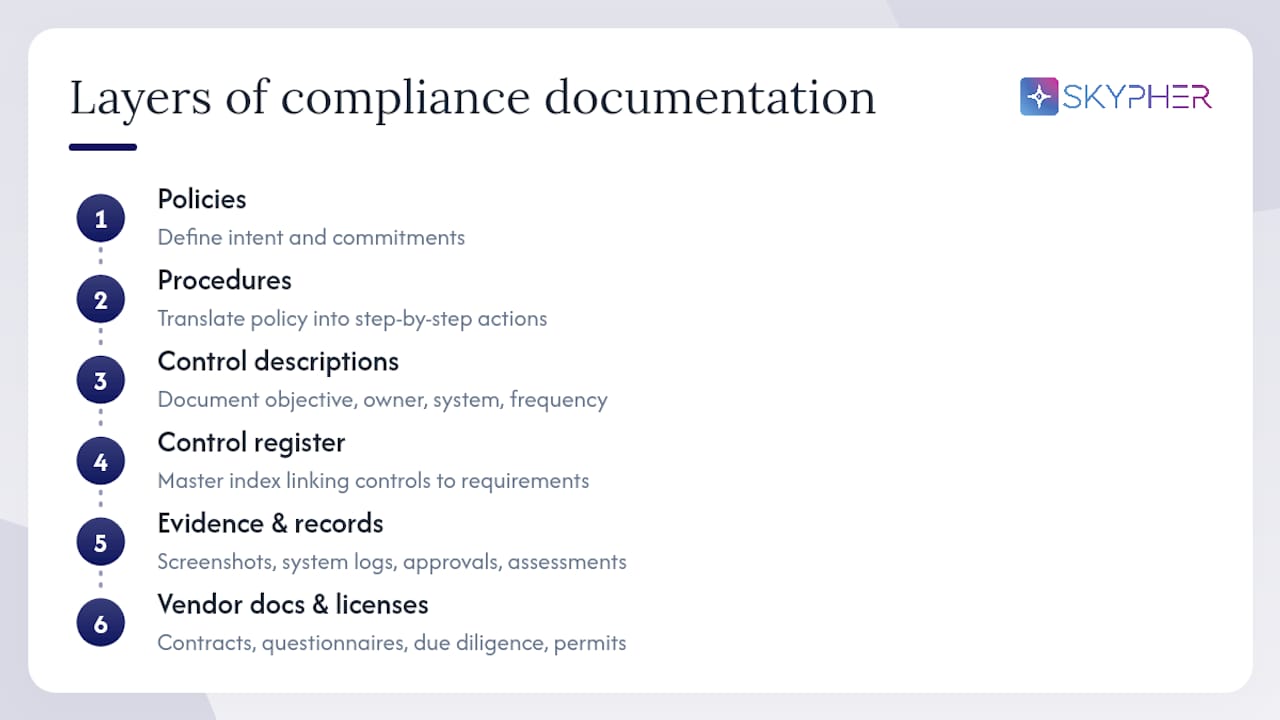
Policies define the organization's intent and commitments — your Information Security Policy or Acceptable Use Policy, for example. They sit at the top of the hierarchy and set the "what we will do" standard.
Procedures translate policy into step-by-step instructions. Where a policy says "access to production systems must be restricted," the procedure describes exactly how access requests are submitted, approved, and logged.
Control descriptions document each control's design: its objective, the system or process it applies to, the control owner, and its frequency. These feed directly into a compliance register or control map, which is the master index linking every control to the regulation or framework it satisfies.
Control evidence is what auditors actually test. Screenshots of access reviews, exported system logs, signed approval records — these are the artifacts that prove a control ran as designed during the period under review.
Risk assessments capture identified threats, likelihood ratings, impact scores, and treatment decisions. They show regulators that your program is risk-informed, not just checkbox-driven.
Incident records document what happened, when, who responded, and how the issue was resolved. For frameworks like HIPAA and SOX, incident documentation is mandatory, not optional.
Training records prove that staff completed required awareness or role-specific training, including the date, content version, and individual acknowledgment.
Vendor documents cover third-party risk: contracts, security questionnaire responses, due diligence reports, and any subprocessor agreements relevant to data handling.
Licenses and permits round out the set — operating licenses, certifications (ISO 27001, SOC 2), and any regulatory registrations your organization holds.
Every element above should map back to at least one line in your control register. That mapping is what lets an auditor trace from a regulatory requirement to the control designed to meet it, and from that control to the evidence proving it worked.
Which document types should you actually keep?
Organizing your regulatory compliance records by function makes gap analysis faster and audit packaging cleaner. Below is a function-based inventory with concrete examples and framework relevance.
Governance and policy
- Information Security Policy
- Acceptable Use Policy
- Data Classification Policy
- Risk Management Policy
- Code of Conduct
Mandatory under SOX (internal controls), HIPAA (administrative safeguards), and most ISO/NIST-aligned programs.
Technical and security
- Access Control Procedure and access review logs
- Change Management Log and change request records
- Vulnerability scan reports and penetration test results
- System configuration baselines
- Patch management records
Required evidence for SOC 2 Type II, PCI DSS, and NIST SP 800-53 assessments.
Privacy and data handling
- Data Processing Agreements (DPAs)
- Records of Processing Activities (RoPAs)
- Privacy Impact Assessments (PIAs)
- Data retention and deletion schedules
- Consent management records
HIPAA's Privacy Rule and GDPR (for organizations with EU data subjects) both require these. For nearshore compliance contexts, DPAs and cross-border transfer records are especially critical.
Incident and business continuity
- Incident Response Plan and post-incident reports
- Business Continuity Plan (BCP) and test results
- Disaster Recovery Plan (DRP) and recovery time objective (RTO) documentation
- Breach notification records
Vendor and third-party
- Vendor risk assessment questionnaires and responses
- Third-party contracts with security and compliance clauses
- Subprocessor lists
- Annual vendor review records
HR and training
- Security awareness training completion logs
- Role-specific training records (e.g., HIPAA workforce training)
- Background check records
- Employee acknowledgment forms for policies
Licenses, certifications, and contracts
- Operating licenses and regulatory registrations
- ISO 27001 or SOC 2 certificates
- Customer contracts with compliance obligations
- SLAs with security and audit-right clauses
Audit and assessment evidence
- Internal audit reports and findings logs
- External audit reports
- Control testing workpapers
- Remediation tracking records
Where tools and automation reduce documentation friction
No compliance team has the bandwidth to manage evidence collection, version control, and questionnaire responses entirely by hand. The right tool categories address different parts of the lifecycle.
Document management systems (DMS) handle storage, version control, access permissions, and retention scheduling. They are the foundation layer. A DMS without audit-trail logging does not meet SEC or FINRA electronic recordkeeping standards.
GRC platforms sit above the DMS and connect documents to controls, frameworks, and risk registers. They let you see, at a glance, which controls have current evidence and which are overdue for review. Evaluating GRC compliance software is worth doing carefully — the platform needs to support your specific frameworks and integrate with your operational systems.
TPRM and vendor portals manage the third-party documentation workflow: sending questionnaires, collecting responses, tracking remediation, and storing vendor evidence. Many integrate directly with GRC platforms so vendor risk feeds into your central control register.
SIEM and log archive tools capture the technical evidence layer — access logs, authentication events, configuration changes — and store them in a tamper-evident format. This is where your control evidence for access management and change management actually lives.
Questionnaire automation is where teams in tech and finance recover the most time. When a customer or prospect sends a security questionnaire, the response process typically requires pulling evidence from multiple systems, coordinating across security, legal, and IT, and formatting answers to match the questionnaire's structure. Skypher's AI-powered recommendation engine draws on your existing knowledge base to generate accurate, consistent answers at speed, with the ability to handle even 200 questions in under a minute. Integrations with Slack, MS Teams, Confluence, Notion, Google Drive, OneDrive, and SharePoint mean the evidence your team already maintains flows directly into the response workflow.
A practical automation workflow looks like this: access logs flow from your identity provider into your SIEM, which archives them in an audit-trail-compliant format. Your GRC platform pulls a summary of access review completions as control evidence. When a customer questionnaire arrives, Skypher surfaces the relevant policy documents and evidence artifacts from your knowledge base, pre-populates answers, and flags anything that needs a human review. The result is a response that is both faster and more consistent with your actual documented controls.
When evaluating any tool in this stack, require: an immutable audit trail, exportability in a standard format, WORM or audit-trail-compliant storage for regulated records, and role-based access controls.
What auditors actually expect from your documentation
Audit documentation standards are specific about what "sufficient" means. Under ISA 230, documentation must enable an independent, experienced auditor to understand the procedures performed, the results obtained, and the basis for significant professional judgments — including who performed and reviewed the work, and when.
What auditors look for in an audit pack: a complete index of in-scope controls; the policy or procedure governing each control; dated evidence that the control operated during the audit period; signed training records for relevant staff; a change history showing when documents were last reviewed and by whom; and a log of any significant findings or inconsistencies and how they were resolved.
Failing to document how significant inconsistencies were resolved is one of the most common causes of audit findings. If a vulnerability scan flagged a critical issue and your team remediated it, the remediation steps, timeline, and sign-off must appear in the record. An auditor who finds a gap in the evidence trail will assume the control did not operate, regardless of what actually happened.
Practical evidence presentation tips:
- Export logs as immutable files (CSV or PDF) with system-generated timestamps, not manual exports that could be edited.
- Sign policy acknowledgments as PDFs with a digital signature or a dated e-signature platform record.
- Screenshot evidence should include the system name, date, and the user who ran the query — not just the output.
- Organize your audit pack with a cover index that maps each control to its evidence file. Auditors work faster, and faster auditors find fewer incidental issues.
For security documentation in tech and finance, the audit pack structure above applies directly to SOC 2, ISO 27001, and FINRA examinations.
Common failures that trigger audit findings
Most audit findings trace back to a small set of recurring mistakes. Recognizing them early is the fastest way to reduce your risk score.
Stale policies. Cause: no scheduled review cadence, or reviews happen but approvals are not recorded. Fix: before → after. Before: policies last updated two years ago with no approval signature. After: annual review calendar event, owner-assigned, with a version log entry and dated approver signature on every revision.
Evidence gaps. Cause: controls are designed but evidence collection is manual and inconsistent. Fix: before → after. Before: access review completed verbally in a meeting, no artifact saved. After: access review output exported from the identity provider, saved to the GRC platform with a timestamp and reviewer name.
Version control failures. Cause: multiple copies of the same document in different locations, no single authoritative version. Fix: before → after. Before: three versions of the Incident Response Plan in three folders, none clearly marked current. After: single repository with version numbers, effective dates, and all prior versions archived as read-only.
Ownership ambiguity. Cause: documents assigned to a team or department rather than a named individual. Fix: before → after. Before: "IT Team" listed as owner of the Access Control Policy. After: a named individual with a title, a review date, and a calendar reminder.
Unsecured or unverifiable evidence. Cause: evidence stored in editable shared drives without access logging. Fix: before → after. Before: screenshots saved in a shared Google Drive folder with edit access for the whole team. After: evidence stored in a write-protected repository with an audit trail of who uploaded what and when, meeting the SEC's electronic recordkeeping standards for authenticity.
Undocumented remediation. Cause: issues are fixed operationally but the fix is never recorded in the compliance system. Fix: before → after. Before: a critical vulnerability patched with no ticket closure note in the compliance record. After: remediation steps, responsible party, completion date, and re-test result all logged against the original finding.
Key Takeaways
Compliance documentation is only as strong as the governance, ownership, and evidence collection practices behind it — a well-structured lifecycle with named owners and automated evidence capture is what separates audit-ready programs from reactive ones.
| Point | Details |
|---|---|
| Define and map every document | Link each artifact to a control and a regulatory requirement in a central register. |
| Assign named owners | Every document and control needs a specific individual accountable for currency and evidence. |
| Apply U.S. retention rules | FINRA's six-year default, HIPAA's policy retention period, and SOX's workpaper retention period are non-negotiable minimums. |
| Automate evidence collection | Continuous automated capture from operational systems eliminates the manual-collection gaps auditors find. |
| Run mock audits annually | Assembling a full audit pack before the real request reveals gaps while you still have time to fix them. |
The case for treating documentation as an operational tool
The teams that consistently pass audits without scrambling share one habit: they stopped treating documentation as a periodic deliverable and started treating it as a live operational system. That shift sounds simple, but it requires buy-in from compliance, IT, legal, and operations simultaneously — and that alignment is harder to achieve than any technical implementation.
What actually works is starting with the controls that carry the highest regulatory and contractual risk, assigning real owners with real calendar commitments, and automating the evidence collection for those controls first. The rest of the document inventory can follow. What does not work is a documentation sprint before an audit, where teams backfill evidence and update policies retroactively. Auditors are trained to spot the difference between a living program and a point-in-time cleanup, and the timestamps on your files tell the story before you say a word.
The cultural piece matters too. When compliance documentation is embedded in how IT closes a change ticket, how HR records a training completion, and how security logs an access review, it stops being "the compliance team's problem" and becomes a natural output of normal operations. That is the state worth building toward, and it is achievable with the right ownership model, the right tooling, and the right expectation-setting from leadership.
Authoritative sources and templates to consult
The resources below are the primary authorities and practical starting points for U.S.-focused compliance documentation work.
- GRC framework (whitepaper) | MetricStream
- FINRA Rule 4511 — Books and records
- ISA 230 — Audit Documentation (explanatory material)
- Amendments to Electronic Recordkeeping Requirements for Broker-Dealers | SEC
- Final rule: Electronic recordkeeping requirements (SEC)
- Compliance documentation: Types, benefits and challenges | Sprinto
- Compliance documentation: Importance & process | SafetyCulture
- What is compliance documentation and how to get it right | MeisterTask
This article provides general informational guidance on compliance documentation practices and does not constitute legal, regulatory, or professional compliance advice. Confirm current requirements with the applicable regulatory authority or a qualified compliance professional.