

Security questionnaire automation is the category enterprise buyers actually need when they search for a security software review in this context, not endpoint or antivirus tools. It replaces manual SIG and CAIQ responses with AI drafting, evidence citation, and SME approval workflows that can cut cycle time from weeks to days. Skypher is one of the recommended enterprise-ready platforms worth piloting, especially for teams juggling multiple portals and formats.
TL;DR:
- Automation platforms like Skypher can reduce questionnaire response times from weeks to days and cut costs per questionnaire by up to 80%.
- Verify that the software provides traceable evidence citations, supports multiple formats, and routes low-confidence answers to human reviewers.
- Run real demo tests by importing actual questionnaires, checking auto-fill accuracy, citation validity, and handling of conditional sections.
- Conduct a focused pilot using real questionnaires, connect core systems, and track metrics like cycle time and SME review hours for early ROI validation.
- Expect pricing to scale with questionnaire volume and integration complexity, and ensure vendor support and certifications meet enterprise security standards.
Table of Contents
- What Is Security Questionnaire Automation Software?
- What ROI Should You Expect From Automation?
- Which Capabilities Should You Verify Before You Buy?
- How Do You Run a Pilot That Proves Value Fast?
- What Do Pricing Models and Total Cost of Ownership Look Like?
- How Does Vendor Support Compare Across Providers?
- Which Certifications Should You Expect From a Provider?
- What Do User Reviews Say About Market Reputation?
- What Questions Should You Ask Before Choosing a Solution?
- Why Skypher Fits This Evaluation Checklist
- Practical Pitfalls to Avoid When Rolling Out Automation
- Sources
What Is Security Questionnaire Automation Software?
When compliance and sales teams search for a security software review, they are almost never comparing antivirus suites. They are trying to find the platform that will draft, cite, and route answers to a 200-question SIG Lite without pulling three analysts off their real jobs for a week.
Security questionnaire automation follows a specific workflow: ingest and parse an incoming questionnaire, draft answers from an approved knowledge base, attach evidence citations, route uncertain answers to a subject matter expert, then submit through the requester's preferred format. That is fundamentally different from endpoint or antivirus software, which protects devices and networks rather than answering vendor risk assessments.
The category exists because enterprise buyers now demand proof, not promises, before signing a contract. That proof usually arrives in one of a handful of recognized formats:
- Standardized Information Gathering (SIG and SIG Lite) questionnaires
- CAIQ from the Cloud Security Alliance
- VSAQ-style vendor security assessment templates
- Framework-mapped questions tied to NIST or SOC 2 controls
- Native portal formats inside tools like OneTrust or ServiceNow
A platform that only handles one or two of these formats will bottleneck your team the moment a prospect's procurement office sends something unfamiliar.
What ROI Should You Expect From Automation?
The financial case for questionnaire automation is not theoretical. Vendor case studies show average response time dropping from around two weeks down to a few days when teams combine AI drafting with a governed answer library and evidence linkage, and cost per questionnaire can fall by 65% to 80% in the same shift.
That speed compounds where it matters most: deal velocity. A questionnaire that used to stall a proof of concept for two weeks becomes a same-week turnaround, which shortens the sales cycle and reduces the number of deals that go cold waiting on security sign-off. Three effects show up consistently once teams adopt automation:
- Fewer inconsistent answers across similar questionnaires, since every response traces back to the same governed source
- Shorter POC timelines because security review stops being the longest step in the sales process
- Lower burnout on GRC teams that previously treated questionnaire season as a recurring fire drill
Automation also changes the nature of the work itself. Instead of retyping the same control descriptions from memory, teams shift toward maintaining and expanding the evidence library that every future questionnaire draws from, which compounds in value with each new cycle.
Which Capabilities Should You Verify Before You Buy?
A security software review that only compares marketing pages will miss the differences that matter once you are three months into deployment. The rubric that holds up under pressure focuses on outcomes, not features: speed, accuracy, auditability, and portal support are the four axes that predict whether a tool earns its subscription cost.
Run through this checklist before signing anything:
- GRC and evidence grounding. Every drafted answer should cite the policy, control, or prior response it came from, not a generic AI paraphrase with no traceable source.
- Audit trail and version history. Confirm the platform logs who approved each answer, when, and against which version of your policy library.
- Portal and format coverage. Ask specifically about SIG, CAIQ, VSAQ, Word, PDF, and native auto-fill inside the requester's portal, whether that is OneTrust, ServiceNow, or a proprietary intake form.
- SME routing and confidence scoring. Low-confidence answers should route automatically to a human reviewer rather than get submitted unchecked.
- Integration surface. Check connectors to your GRC system, Slack or Teams for review notifications, and drives like SharePoint, Google Drive, or Confluence where your policies actually live.
- Multilingual support. If you sell into markets outside the English-speaking world, confirm the platform can draft and cite in those languages natively.
Beyond the checklist, weigh three operational criteria that rarely show up in a sales deck: time-to-value during onboarding, how much manual tagging your knowledge base needs before answers are trustworthy, and the governance model around answer expiration and re-approval as policies change.
Then validate all of it live. Do not take a vendor's word for portal handling. Pro Tip: Bring your own recent questionnaire, including one with conditional logic and file attachments, and watch the platform auto-fill it in real time rather than reviewing a canned demo script.
Run three specific tests during any demo:
- Import a real portal questionnaire and confirm the auto-fill handles conditional sections, not just flat question lists.
- Feed it 200 or more questions and time both the draft speed and how many answers arrive with a usable evidence citation attached.
- Click into a handful of citations and confirm they point to an actual document, not a hallucinated summary.
Validating portal support and citation traceability during the demo, rather than assuming the sales deck is accurate, is the single highest-leverage step in the entire evaluation process.
How Do You Run a Pilot That Proves Value Fast?
You do not need a company-wide rollout to know whether a platform works. A tightly scoped pilot answers the question in weeks, not quarters.
- Pick several real questionnaires, including at least one native portal submission and one that requires a cross-functional reviewer outside the security team, such as legal or engineering.
- Connect your core systems first. Wire up your GRC platform, your document storage (SharePoint, Google Drive, Confluence, whichever you actually use), and your review notification channel, typically Slack or Teams.
- Import your existing knowledge base and set initial routing rules: which question categories need SME approval every time, and which can go straight to submission once confidence is high.
- Set a conservative confidence threshold at the start. Route anything under that threshold to a human reviewer and lower the threshold gradually as your citation coverage improves.
- Track four metrics from day one: cycle time per questionnaire, SME review hours, the acceptance rate of AI-drafted answers, and the percentage of questions fully autocompleted without edits.
Most teams see initial ROI within a few weeks, with full optimization arriving closer to a few months depending on how complex the knowledge base is and how much bandwidth stakeholders have to review early drafts.
If your pilot cannot hit at least directional progress on cycle time and SME hours by week eight, that is the signal to revisit connector configuration before scaling further, not to abandon the approach entirely.
What Do Pricing Models and Total Cost of Ownership Look Like?
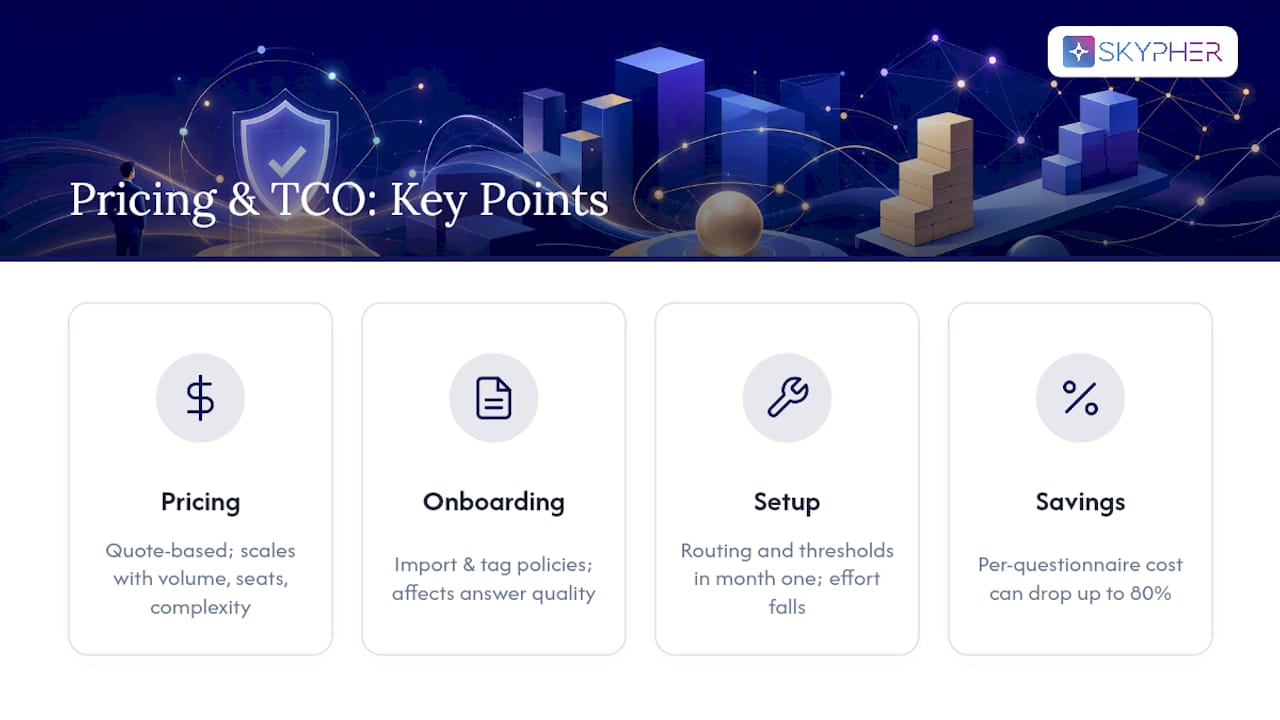
Most security questionnaire automation platforms, including Skypher, price on a quote-based enterprise model rather than posting flat public tiers, because cost scales with questionnaire volume, number of seats, and the complexity of your integration footprint. That structure makes sense once you consider that a five-person compliance team answering multiple questionnaires monthly has a very different footprint than a 200-person sales org spread across multiple product lines and entities.
Total cost of ownership extends beyond the subscription line. Budget for onboarding time to import and tag your existing policy library, since answer quality depends directly on how well-organized that source material is. Factor in the internal hours needed to configure routing rules and confidence thresholds during the first month, even though that investment shrinks sharply after the pilot phase.
The comparison that actually matters is not subscription cost against zero. It is subscription cost against the fully loaded cost of the analyst hours a manual process consumes every single month, plus the opportunity cost of deals that stall waiting on security sign-off. A platform priced at what looks like a meaningful annual commitment can still pay for itself inside one or two quarters once you account for cost per questionnaire dropping by up to 80% and the sales cycles that no longer stall in the security review stage.
Ask any vendor for a cost breakdown tied to your actual questionnaire volume before you compare sticker prices across platforms, since a lower base price paired with per-questionnaire overage fees can end up costing more at your scale.
How Does Vendor Support Compare Across Providers?
Support quality separates platforms that work in a demo from platforms that work at 2 a.m. during a compliance deadline. Enterprise buyers should ask three concrete questions rather than accepting "24/7 support" as a checkbox.
First, ask who actually responds. A support model built around a shared inbox with a 24-hour SLA behaves very differently from one backed by a named implementation team that already understands your knowledge base structure. Second, ask how onboarding support is staffed. The first 30 days determine whether your knowledge base gets tagged correctly, and a vendor that treats onboarding as self-serve documentation will cost you weeks of trial and error. Third, ask what happens when the AI gets something wrong. A platform with strong support has a clear escalation path for flagging a bad citation or an outdated policy reference, not just a generic ticket queue.

Enterprise-tier support, the kind that includes a dedicated success contact and guaranteed response windows around the clock, matters most for organizations running multiple product lines or entities through the same platform, since a support gap during a live sales cycle can cost a deal outright. Smaller teams with simpler questionnaire volume may tolerate a lighter support tier without much risk. Weigh your support needs against your actual deal velocity and questionnaire complexity, not against a generic tier name on a pricing page.
Which Certifications Should You Expect From a Provider?
Any platform asking you to trust it with your security policies, past questionnaire answers, and control evidence should be able to show its own compliance posture without hesitation. That is table stakes, not a differentiator.
At minimum, expect a provider to hold SOC 2 Type II certification, since that demonstrates independently audited controls around data security, availability, and confidentiality. Many enterprise-grade providers also maintain ISO 27001 certification, which signals a formal information security management system rather than ad hoc practices. If you operate in regulated industries such as finance or healthcare, ask specifically about data residency options and whether the provider supports single sign-on protocols like SAML or OIDC, since those integrations matter for your own access governance.
The irony of this category is worth naming directly: a platform that automates your security questionnaires should be able to answer its own security questionnaire cleanly, quickly, and with full evidence citation. If a vendor struggles to produce its own SOC 2 report or hesitates on data handling questions, treat that as a real signal about how the product will perform once you depend on it daily. A customer-facing Trust Center that lets prospects self-serve a provider's own certifications and audit reports is itself a strong proof point, since it shows the vendor uses its own category of tool to manage its own security posture.
What Do User Reviews Say About Market Reputation?
Reputation in this category tends to track three recurring themes across user feedback: speed gains, the learning curve during onboarding, and how well the AI's drafted answers hold up to SME scrutiny.
Teams that report the strongest outcomes almost always describe a deliberate onboarding period where they spent real time organizing their policy library and setting sensible confidence thresholds before trusting the platform with live questionnaires. Reviews that describe disappointment usually trace back to skipping that step, expecting the AI to perform well against an unorganized or outdated knowledge base on day one.
A second recurring theme is portal reliability. Teams that tested portal auto-fill against real, messy questionnaires before committing report far fewer surprises than teams that judged a platform purely on a polished sales demo. That aligns with the broader industry consensus that portal support is an outsized risk factor worth validating directly rather than taking on faith.
The third theme, and arguably the most reassuring one for risk-averse buyers, is that platforms combining AI drafting with genuine GRC integration and a human approval gate consistently outperform simpler template libraries in long-term satisfaction. Pure template-matching tools deliver limited ROI once questionnaire volume or complexity grows, which shows up in reviews as frustration that the tool "stopped scaling" after the first few months.
What Questions Should You Ask Before Choosing a Solution?
The strongest procurement conversations start with a short, pointed list of questions rather than a broad feature comparison. Ask each finalist vendor the following directly, and pay close attention to how specifically they answer:
- How does the platform cite evidence for each drafted answer, and can you show me a citation that traces to an actual source document right now?
- What happens to a low-confidence answer? Does it route to a human, or does it get submitted as-is?
- Which portals and formats have you actually tested auto-fill against, not just claimed support for?
- How many third-party integrations do you maintain, and do they include the specific GRC platform and collaboration tools our team already uses?
- What is your own SOC 2 or ISO 27001 status, and can we see it through a self-service Trust Center rather than requesting it manually?
- What does a realistic pilot timeline look like for an organization with our questionnaire volume and knowledge base complexity?
Vague or evasive answers to any of these are a warning sign worth taking seriously before you commit budget. A vendor confident in its product will answer the citation and portal questions with specifics, not reassurance.
Why Skypher Fits This Evaluation Checklist
Everything in the checklist above maps directly onto what Skypher was built to solve. Skypher's proprietary parsing and retrieval models can answer 200 or more questions in under one minute while attaching evidence citations to each draft, which addresses the speed and traceability tests you would run in any serious demo.

On the integration front, Skypher connects to more than 40 third-party risk management and collaboration platforms, including Slack, Microsoft Teams, Confluence, Notion, Google Drive, and SharePoint, so your existing GRC and document workflows plug in rather than requiring a rebuild. The platform's AI-powered recommendation engine handles the drafting and citation work, while flexible import and export workflows cover the SIG, CAIQ, Word, PDF, and native portal formats that trip up narrower tools. A customizable Trust Center lets your prospects self-serve your security posture during POCs, cutting down the repetitive questions that stall sales cycles, and multilingual support handles enterprise setups spanning multiple products or entities.
The realistic next step is a scoped pilot: pick your five hardest recent questionnaires, connect your knowledge base, and measure cycle time and SME review hours against your current baseline. Request a Skypher demo to see the portal auto-fill and citation traceability run against your own questionnaire, not a canned script.
Practical Pitfalls to Avoid When Rolling Out Automation
The mistakes that derail these deployments are predictable. Teams let the AI answer questions with generic, unlinked text instead of citations, which collapses trust the first time a skeptical reviewer clicks through and finds nothing. Others skip SME gating entirely to chase speed, then discover an outdated answer went to a major prospect. A stale knowledge base is the quiet killer: if your policy library has not been updated in six months, the AI is confidently drafting from old information.
On governance, assign clear ownership over the answer library, set expiration dates on sensitive answers so they force re-approval, and keep version history intact so you can trace exactly what changed and when. Start confidence thresholds conservatively and loosen them only as citation coverage matures.
— Gaspard
Sources
- Security Questionnaire Automation: How to Cut Response Time by 80% - Compyl
- Best security questionnaire automation software for 2026: what to buy (and what to avoid) | SecureSlate