

TL;DR:
- SSO authentication enables users to access multiple applications with a single login through a trust relationship with an identity provider. It relies on secure token exchange and session management to maintain access, emphasizing the importance of key rotation and rigorous validation for security. Implementing MFA, continuous auditing, and adopting passwordless solutions strengthen SSO security and control cross-application access risks.
SSO authentication is defined as a centralized identity service that lets users log in once and access multiple applications without re-entering credentials, relying on a trust relationship between an identity provider (IdP) and one or more service providers (SPs). For IT teams managing dozens of enterprise applications, from Microsoft 365 to Salesforce to internal tools, this single authentication event eliminates credential sprawl and reduces the attack surface tied to weak or reused passwords. The mechanism runs on established protocols like SAML and OpenID Connect (OIDC), and major platforms including Google, Okta, and Azure Active Directory all implement it at scale. Understanding how SSO authentication works at the token and session level is what separates a secure deployment from a convenient one.
What is SSO authentication and how does it work?
SSO authentication is an authentication service that lets users access multiple applications with one set of login credentials through a centralized IdP and SP trust relationship. The SP never stores or validates the user's password directly. Instead, it delegates that responsibility entirely to the IdP, which issues a short-lived cryptographically signed token after successful authentication.
The authentication flow follows a consistent sequence:
- User requests access to a connected application (the SP), such as a corporate HR portal or cloud storage tool.
- SP checks for an active session. If none exists, it redirects the user to the configured IdP, such as Okta or Azure AD.
- User authenticates at the IdP using credentials, and optionally completes MFA. The IdP validates the identity.
- IdP issues a short-lived token or assertion, cryptographically signed to prevent tampering.
- Token is passed back to the SP, either via browser redirect (SAML) or a token endpoint (OIDC).
- SP validates the token, verifying the signature and expiration, then grants access and establishes a local session.
- Subsequent app access within the same session skips re-authentication. The user moves between connected apps without additional login prompts.
Token storage varies by implementation. Browser cookies carry session state in many SAML deployments, while OIDC implementations often use short-lived access tokens and refresh tokens stored in memory or secure storage. Token expiration is a deliberate security control, not a UX afterthought. Short validity windows limit the damage window if a token is intercepted.
Pro Tip: Set IdP session timeouts to match your organization's risk tolerance, not the vendor default. A 12-hour session may suit a low-risk internal tool but is inappropriate for a financial reporting system. Align session length with data sensitivity.

Key security considerations for SSO deployments
SSO is not a security silver bullet. Because one authentication event unlocks access to many systems, the IdP becomes a high-value target. Token forgery, theft, and misuse are the primary attack vectors, and NIST IR 8587 provides implementation guidance focused on secure-by-design architecture and continuous monitoring to address them. This means the security of your entire SSO ecosystem depends on how well you protect and manage those tokens.
The most critical risks to address include:
- Token theft via man-in-the-middle attacks. Unencrypted transport between IdP and SP endpoints exposes tokens to interception. InCommon federation baseline mandates encrypted endpoints and incident response trust for all federated deployments.
- Token forgery through weak key management. If signing keys are not rotated regularly, a compromised key allows an attacker to forge valid tokens indefinitely. NIST recommends continuous key rotation, token signature verification, and monitoring as core controls.
- Session hijacking after valid authentication. Even a legitimately issued token can be stolen from browser storage or network traffic. SP-side controls must verify token validity on every request, not just at login.
- Single point of failure risk. If the IdP goes down or is compromised, access to all connected SPs is affected simultaneously. Redundancy planning and incident response procedures are not optional.
"Federation trust is operationalized through compliance with endpoint encryption, security incident response trust frameworks, and metadata trust configurations, not just through protocol adherence." — InCommon Federation Trust Framework
NIST SP 800-63C-4 establishes that identity federation involves a credential service provider supplying authentication and subscriber attributes to multiple relying parties via assertions. This framing matters because it shifts accountability. The IdP is not just a login page. It is a trust anchor for your entire application portfolio, and its security posture directly determines the security of every SP it serves. Implementing the SIRTFI incident response framework alongside your IdP configuration gives you a structured path for handling federation-related security events.
SAML vs. OpenID Connect: which protocol fits your environment?
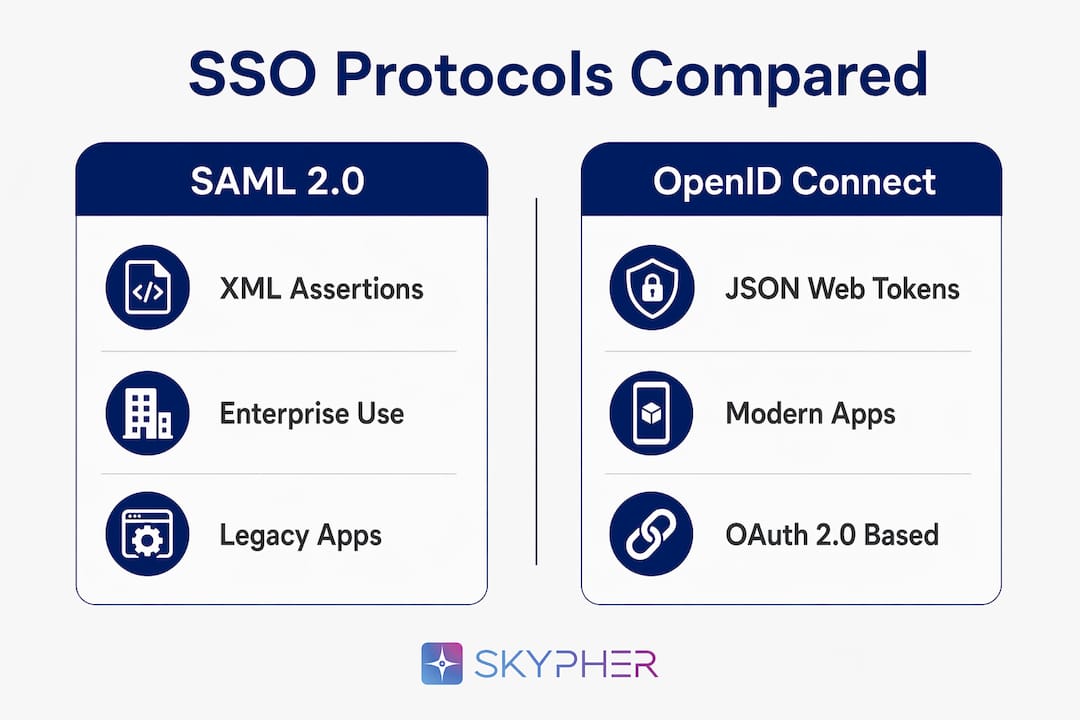
SAML and OpenID Connect represent the two dominant SSO protocols, and choosing between them is a decision with long-term architectural consequences. Both achieve the same goal but differ significantly in structure, token format, and ideal use case.
| Feature | SAML 2.0 | OpenID Connect (OIDC) |
|---|---|---|
| Data format | XML assertions | JSON Web Tokens (JWTs) |
| Primary use case | Enterprise web apps, legacy systems | Web and mobile applications |
| Complexity | Higher, verbose XML schema | Lower, REST-based and developer-friendly |
| Token type | SAML assertion | ID token + access token |
| Major IdP support | Azure AD, Okta, ADFS | Google, Okta, Auth0, Azure AD |
| Mobile support | Limited | Native |
SAML 2.0 dominates enterprise environments because it was designed for them. Organizations running legacy ERP systems, on-premises HR platforms, or government portals will find SAML support baked into most enterprise software. The trade-off is complexity. SAML assertions are verbose XML documents, and debugging a misconfigured SAML integration requires patience and tooling like SAML-tracer for Chrome.
OIDC is built on OAuth 2.0 and uses compact JSON Web Tokens, making it the natural choice for modern web applications and any environment where mobile clients need to authenticate. Google's consumer sign-in, GitHub's OAuth flow, and most modern SaaS platforms default to OIDC. The token structure is easier to inspect, validate, and integrate with API gateways.
Pro Tip: If your organization runs both legacy enterprise apps and modern SaaS tools, deploy an IdP like Okta or Azure AD that supports both SAML and OIDC simultaneously. This avoids maintaining separate identity silos for different application generations.
Cross-domain federation, where users from one organization authenticate into another organization's SP, relies on both protocols but adds a layer of metadata trust. Azure AD's B2B federation and InCommon's academic federation network are practical examples of this model operating at scale.
Best practices for SSO in organizational security
Deploying SSO without a disciplined operational model creates the exact risk it was meant to reduce. The following practices reflect what mature enterprise security teams actually implement, not just what vendor documentation recommends.
- Enforce MFA at the IdP, not the SP. MFA at the IdP login mitigates credential-based attacks even when SSO convenience removes per-app password prompts. Cisco Duo, Microsoft Authenticator, and Google Authenticator all integrate directly with major IdPs.
- Audit SSO session logs continuously. Unusual login times, geographic anomalies, or rapid SP-switching within a session are indicators of token misuse. Feed IdP logs into your SIEM, whether that is Splunk, Microsoft Sentinel, or Elastic Security.
- Control token lifetimes by application sensitivity. Short-lived tokens for financial and HR systems, longer sessions for low-risk productivity tools. This is a configuration decision, not a default.
- Align SSO controls with compliance frameworks. SOC 2 and ISO audits require explicit documentation of session management and authentication controls. SSO token policies need to appear in your control library, not just your architecture diagrams.
- Manage third-party IdP risk. When you federate with an external IdP, you inherit its security posture. Review vendor security practices for any IdP you trust, including their key management and incident response capabilities.
The most common pitfall in SSO deployments is treating the initial configuration as a finished state. Token signing certificates expire. Key rotation schedules slip. New SPs get added without security review. Building a recurring review cadence into your identity governance program prevents these gaps from becoming incidents. Organizations that align their SaaS security standards with SSO controls report fewer access-related incidents because the controls are documented, tested, and audited rather than assumed.
Passwordless SSO, where authentication relies on hardware tokens like YubiKey, biometrics, or passkeys rather than passwords, is the direction the industry is moving. Microsoft and Apple both support passkey-based authentication that integrates with OIDC flows, removing the password from the equation entirely while keeping the single-session model intact.
Key takeaways
SSO authentication is only as secure as the token management, session controls, and key rotation practices that support it.
| Point | Details |
|---|---|
| SSO defined | One login at the IdP grants access to multiple SPs via signed, short-lived tokens. |
| Protocol choice matters | SAML suits enterprise legacy apps; OIDC fits modern web and mobile environments. |
| Token security is the core risk | Key rotation, signature verification, and encrypted transport prevent forgery and theft. |
| MFA amplifies SSO security | Enforcing MFA at the IdP protects all connected SPs without per-app friction. |
| Compliance requires documentation | SOC 2 and ISO audits demand explicit SSO session and token controls in your control library. |
Why SSO security is a token problem, not a login problem
Most organizations I've seen treat SSO as a user experience improvement. They deploy Okta or Azure AD, connect their apps, and declare the project done. That framing misses the actual security work.
The login event is the easy part. What happens after authentication is where the real risk lives. A signed token sitting in a browser cookie is a portable credential. If that token is stolen before it expires, the attacker has everything the legitimate user has, across every connected SP, without needing the user's password. The threat is not at the login screen. It is in transit, in storage, and in the validation logic on the SP side.
I've reviewed SSO configurations where SPs were not verifying token signatures at all. They were trusting the assertion because it arrived from the right URL. That is not token validation. That is wishful thinking. Rigorous SP-side token validation, including signature checks and expiration enforcement, is non-negotiable.
The emerging shift toward passwordless SSO using passkeys and hardware authenticators is the most meaningful security improvement I've seen in identity management in years. It removes the password as an attack surface entirely. If you are planning an SSO refresh in 2026, that is where I would focus the architecture conversation, not on which IdP has the best dashboard.
— Gaspard
How Skypher helps you manage SSO-related security reviews

Security questionnaires from clients and partners increasingly ask detailed questions about your SSO implementation, token management practices, and federation controls. Answering them accurately and quickly is where Skypher's security questionnaire automation directly reduces your team's workload. Skypher's AI maps your existing security documentation to incoming questions, including those covering SSO protocols, session management, and compliance alignment, so your team spends minutes instead of days on each review. The platform's Trust Center lets you proactively share your authentication and compliance posture with prospects and auditors, reducing back-and-forth on SSO-related due diligence. If your organization handles frequent security reviews, Skypher turns SSO documentation from a manual burden into a repeatable, auditable process.
FAQ
What does SSO mean in enterprise security?
SSO stands for Single Sign-On. It is an authentication method that allows users to log in once to a central identity provider and access multiple connected applications without re-entering credentials during the active session.
How does SSO differ from multi-factor authentication?
SSO and MFA solve different problems. SSO reduces the number of login events by centralizing authentication, while MFA adds verification layers to each login event. The two work best together, with MFA enforced at the IdP to protect the single authentication point that SSO creates.
Is SSO secure for cloud services?
SSO is secure when implemented with encrypted transport, short-lived tokens, regular key rotation, and SP-side token validation. Without these controls, the centralized nature of SSO creates a high-impact single point of failure, as noted in NIST IR 8587 guidance.
What are the most common SSO authentication examples?
Logging into Google and then accessing Gmail, Google Drive, and Google Meet without additional logins is a consumer SSO example. In enterprise environments, authenticating through Okta or Azure AD to access Salesforce, Workday, and internal tools within a single session is the standard model.
What is the difference between SAML and OIDC in SSO?
SAML uses XML-based assertions and is designed for enterprise web applications, while OIDC uses JSON Web Tokens and is built for modern web and mobile apps. Most enterprise IdPs support both, allowing organizations to federate legacy and modern applications from a single identity platform.