

TL;DR:
- Drata automation centralizes continuous evidence collection and control monitoring for compliance frameworks like SOC 2, ISO 27001, HIPAA, and GDPR. It supports deep integrations with cloud and identity providers, enabling up to 85% automation in evidence gathering and aligning compliance controls with developer workflows. Proper setup, human oversight, and strategic integration are key to effective audit readiness and maintaining compliance maturity.
Drata compliance is an automated compliance management approach that centralizes continuous evidence collection, control monitoring, and risk management to support audit readiness across frameworks including SOC 2, ISO 27001, HIPAA, and GDPR. Unlike periodic audit preparation, Drata's platform runs continuous checks against live system configurations, giving compliance officers and IT security professionals real-time visibility into control status. The platform's deep integrations with cloud providers, identity systems, and developer tooling make it a strong fit for engineering-led organizations that need compliance maturity, not just a certification badge. This guide covers setup priorities, key features, common pitfalls, and how to align Drata's capabilities with your risk management program in 2026.
How does Drata compliance automation work?
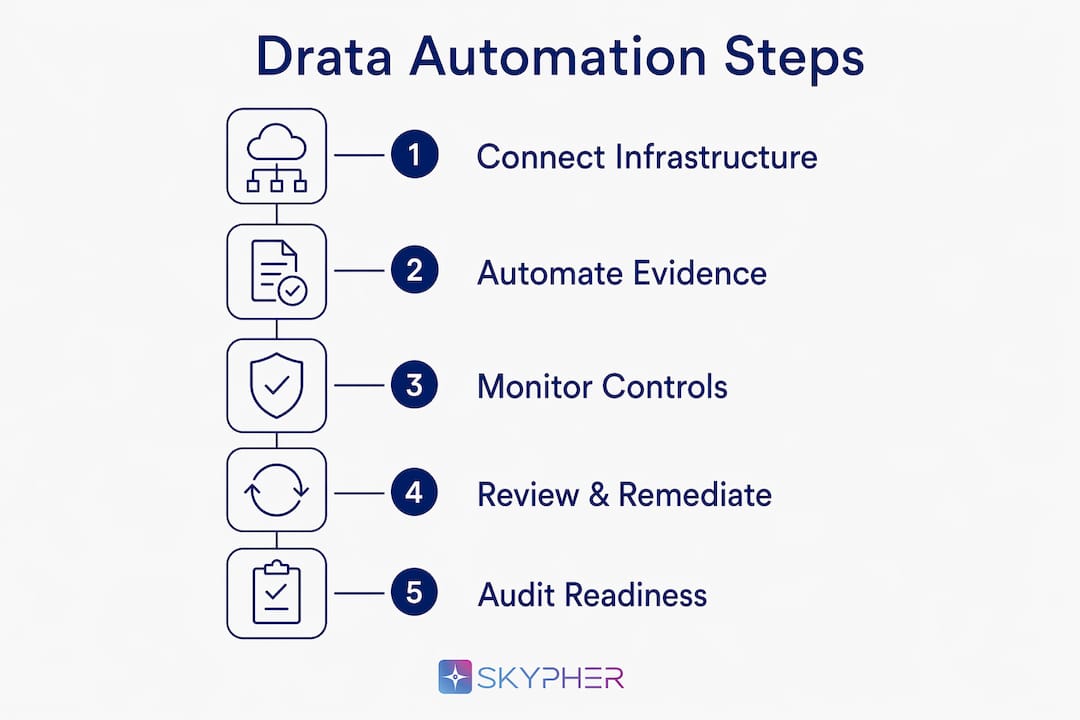
Drata compliance automation works by connecting directly to your existing infrastructure and pulling evidence automatically, rather than waiting for a human to gather screenshots before an audit. The platform supports integrations with AWS, Google Cloud, Azure, Okta, GitHub, Jamf, CrowdStrike, and dozens of other tools. Each integration feeds control evidence into a central dashboard, where Drata maps that evidence to specific framework requirements.

The core differentiator is 85% automated evidence collection across integrated environments. That figure means the vast majority of your audit evidence arrives without manual effort, which cuts preparation time significantly and reduces the risk of gaps caused by human error.
Drata also supports compliance-as-code, which allows teams to define controls in version-controlled YAML files integrated into CI/CD pipelines. That capability matters because it treats compliance controls the same way engineers treat application code: reviewable, testable, and auditable through standard developer workflows. For security teams already operating DevOps practices, this is a natural fit.
How to set up Drata for effective compliance automation
A focused team can reach initial audit-ready configuration in one to two weeks. That timeline assumes you prioritize the right integrations and avoid getting stuck on policy wording before your controls are mapped. The setup sequence below reflects what works in practice.
-
Choose your primary framework first. Start with SOC 2 Security criteria unless you have confirmed plans for ISO 27001 or HIPAA within the next 12 months. If multi-framework coverage is on the roadmap, enable cross-framework control mapping from day one to avoid duplicating work later.
-
Connect your highest-priority integrations. Cloud providers (AWS, GCP, Azure), identity providers (Okta, Azure AD), code repositories (GitHub, GitLab), HR systems, and endpoint management tools (Jamf, Intune) generate the most evidence. Connect these before anything else.
-
Deploy the Drata agent on employee endpoints. The agent collects device-level evidence including disk encryption status, screen lock settings, and antivirus configuration. Plan your rollout communication carefully. Employees need to understand what the agent monitors and why, or deployment stalls.
-
Customize your policies. Drata provides policy templates for every major framework. Review and edit them to reflect your actual practices. Do not skip this step, but do not treat it as a writing project either. The goal is accuracy, not perfection.
-
Run your first dashboard review. After integrations and policies are in place, open the Drata dashboard and work through every failing control. Common gaps at this stage include MFA enforcement, encryption at rest, and audit logging.
Pro Tip: Assign a single owner for each integration during setup. Shared ownership creates delays when credentials expire or configurations need updating. One owner per integration keeps the process moving.
For a detailed walkthrough of the SOC 2 setup process, the Drata SOC 2 implementation guide from Skypher covers integration sequencing and evidence mapping in depth.
What are Drata's key features for compliance teams?
Drata's platform delivers three capabilities that separate it from generic compliance tools: automated evidence collection, compliance-as-code, and an integrated risk management module.
- Automated evidence collection: Drata pulls auditor-grade integration data including AWS IAM policies and S3 bucket configurations, not just surface-level pass/fail checks. That granularity satisfies auditors who need to see the actual configuration, not a summary.
- Compliance-as-code: Control definitions live in version-controlled files, which means changes are tracked, reviewable, and reversible. Engineering teams can propose control changes through pull requests, the same process they use for application code.
- Risk management module: Drata links specific risks to controls and elevates risk alerts when controls fail, meeting ISO 27001 clause 6.1 requirements for operational risk evidence. This is not a static risk register. It is a live connection between your risk program and your control environment.
- Trust Center: Drata's Trust Center publishes your compliance status and certifications to customers and prospects. It reduces the volume of security questionnaires your team receives by making evidence publicly accessible.
- Continuous monitoring: Controls are checked on a recurring schedule, not just before audits. That means you catch drift early, before it becomes an audit finding.
One important limitation: Drata automates evidence collection and control monitoring, but it does not draft policies or conduct audits. Human judgment remains required for policy review, remediation decisions, and auditor engagement.
What are the most common Drata implementation challenges?
Implementation problems with Drata cluster around four areas. Recognizing them early prevents the delays that push audit timelines back by weeks.
- Agent deployment stalls. Proactive communication about monitoring scope is the single most effective way to prevent this. Employees who understand what the agent does and does not monitor are far more likely to install it without resistance. Prepare a clear FAQ for your team before rollout.
- Policy customization extremes. Teams either rush through policies and create audit risk, or they spend weeks debating wording and lose momentum. Balanced, efficient policy review is the recommended approach. Set a time limit per policy and move on.
- Integration cleanup work. Connecting Drata to your identity provider or cloud environment often surfaces misconfigurations you did not know existed. Budget time for remediation work that the integrations reveal, not just the integrations themselves.
- Pricing surprises at renewal. Drata's pricing is quote-only, with entry-level estimates around $7,500 annually. Negotiating a multi-year agreement upfront is the most reliable way to avoid significant price increases at renewal.
Pro Tip: Before your first audit, run a full internal review of your Drata dashboard with your auditor's checklist in hand. Auditors look for the same gaps Drata flags. Closing them before fieldwork begins removes the most common sources of audit delay.
Automation handles evidence collection, but human oversight remains essential for policy review, remediation prioritization, and audit engagement. Teams that treat Drata as a replacement for compliance judgment rather than a tool that supports it tend to fail audits on policy and process questions, not technical controls.
For guidance on managing policy customization and audit risk, the Drata risk management guide from Skypher covers the decision framework in detail.
How does Drata support audit readiness and risk management?
Drata's risk management module connects your risk register directly to your control environment. When a control fails, the associated risk is automatically elevated. That connection gives auditors operational evidence of active risk management, which is exactly what ISO 27001 clause 6.1 requires. A static spreadsheet risk register does not provide that evidence.
For SOC 2 Type II audits, continuous evidence collection removes the most stressful part of fieldwork. Auditors request evidence for a period of time, typically six to twelve months. Because Drata collects and timestamps evidence continuously, your team can produce it on demand rather than reconstructing it from logs and screenshots.
Cross-framework control mapping reduces duplication when you pursue multiple certifications. A single control mapped to both SOC 2 and ISO 27001 requirements means one evidence collection process serves both audits. Teams planning to add HIPAA or GDPR coverage within 12 months should enable this mapping from the start.
The remediation workflow in Drata is where security improvements actually happen. After your dashboard review, prioritize gaps in this order:
- MFA enforcement across all user accounts and administrative access
- Encryption at rest for databases and storage systems
- Audit logging enabled and retained for the required period
- Vulnerability scanning configured and producing results
- Access reviews completed and documented for privileged accounts
Each of these gaps maps directly to SOC 2 Security criteria and ISO 27001 controls. Closing them before your audit window opens is the most direct path to a clean report. You can also use an AI crawlability audit to verify that your public-facing compliance documentation is accessible to automated tools, which matters when auditors and customers rely on your Trust Center.
Key Takeaways
Drata compliance automation delivers the most value when setup is prioritized correctly, integrations are deep, and human oversight is maintained throughout the audit cycle.
| Point | Details |
|---|---|
| Start with the right framework | Begin with SOC 2 Security criteria and enable cross-framework mapping immediately if ISO 27001 or HIPAA is planned within 12 months. |
| Prioritize high-yield integrations | Connect cloud providers, identity providers, and endpoint management tools first to maximize automated evidence coverage. |
| Agent deployment requires communication | Prepare a clear employee FAQ before rollout to prevent installation delays that stall audit timelines. |
| Automation does not replace judgment | Human review of policies, remediation decisions, and auditor engagement remains required despite 85% evidence automation. |
| Negotiate pricing upfront | Secure a multi-year agreement at contract signing to avoid renewal price increases that generate friction later. |
What I have learned from watching teams use Drata in practice
After observing how compliance teams at SaaS companies actually use Drata, the pattern that separates successful programs from struggling ones is integration depth in the first two weeks. Teams that connect their cloud environments, identity providers, and endpoint management tools immediately get accurate control coverage fast. Teams that defer integrations while debating policy wording spend months chasing evidence manually.
The compliance-as-code capability is genuinely underused. Most teams treat it as an advanced feature to explore later. Engineering-led organizations that adopt it early get a compliance program that scales with their infrastructure changes automatically. That is a meaningful operational advantage over teams running manual evidence collection.
Pricing negotiation deserves more attention than it typically gets. Drata is best suited for engineering-led SaaS firms that prioritize compliance maturity, and the platform reflects that in its pricing. Locking in a multi-year rate at signing is not just cost management. It is a signal to your vendor that you are a long-term partner, which tends to improve support responsiveness.
The hardest lesson for most teams is accepting that automation handles evidence but not judgment. I have seen organizations pass their first SOC 2 Type I audit on Drata's strength, then struggle with Type II because their policies did not reflect actual practice. The platform cannot fix that gap. Only consistent human review and honest policy writing can. For teams building out their Drata security program, that distinction is worth internalizing before the first audit cycle begins.
— Gaspard
Skypher's Trust Center as a complement to your compliance program
Compliance officers who invest in Drata's continuous monitoring often face a separate challenge: communicating that compliance posture to customers, prospects, and auditors efficiently.

Skypher's Trust Center platform centralizes your security certifications, policies, and real-time compliance status in one shareable location. Customers and auditors access current evidence without submitting a security questionnaire or waiting for your team to compile a response package. That reduces the volume of inbound questionnaires your team handles and accelerates sales cycles where security review is a bottleneck. Skypher integrates with over 40 third-party risk management platforms and supports real-time collaboration, making it a practical complement to the continuous compliance posture Drata builds. For teams that have invested in compliance automation, Skypher ensures that investment is visible to the people who need to see it.
FAQ
What is Drata compliance used for?
Drata compliance is used to automate evidence collection, monitor controls continuously, and manage risk across frameworks including SOC 2, ISO 27001, HIPAA, and GDPR. It replaces manual audit preparation with real-time, integration-driven evidence gathering.
How long does Drata take to set up?
A focused team can reach initial audit-ready configuration in one to two weeks, provided integrations are prioritized and policy customization is kept efficient rather than exhaustive.
Does Drata automate the entire compliance process?
Drata automates evidence collection at an 85% rate but does not replace human judgment for policy drafting, remediation decisions, or direct auditor engagement. Automation supports the process; it does not run it independently.
What frameworks does Drata support?
Drata supports SOC 2, ISO 27001, HIPAA, GDPR, PCI DSS, and several additional frameworks. Cross-framework control mapping allows a single control to satisfy requirements across multiple certifications simultaneously.
Is Drata suitable for small security teams?
Drata is best suited for engineering-led SaaS organizations with the technical capacity to manage integrations and interpret compliance-as-code features. Smaller teams without dedicated compliance resources may face a steeper learning curve with custom controls.