

Safe software, in the context of security questionnaire automation, means AI that drafts answers only from a live, versioned knowledge base and never publishes a response without a named human sign-off. When those two controls are in place, teams typically cut questionnaire turnaround by 70 to 80 percent without weakening their compliance posture. Platforms exist to enforce that discipline at scale.
TL;DR:
- Automated security questionnaire responses are safest when they use a live, versioned knowledge base and require human sign-off before submission.
- Proper setup of the knowledge base and calibration of confidence thresholds are critical to maintaining accuracy above 95 percent during initial deployment.
- The system must connect directly to documentation sources like SharePoint or Confluence and support specific compliance frameworks with source attribution and audit trails.
- Routine SME review time drops significantly, often to two or three hours, freeing experts to focus on more complex or low-confidence questions.
- A typical two-week pilot involves connecting core documents, configuring framework mapping, and calibrating confidence levels to establish reliable automation.
Table of Contents
- How Safe Security Questionnaire Automation Software Works
- Benefits, Expected Outcomes, and the Trade-Offs Worth Knowing
- The Feature and Safety Checklist Every Vendor Should Meet
- Running a Pilot: Steps, Timeline, and What to Measure
- Key Security Features and Compliance Requirements to Support
- Criteria for Evaluating and Selecting a Vendor
- Getting Your Team to Actually Adopt the New System
- Metrics to Track After You Go Live
- Author's Perspective: What Actually Trips Teams Up
- Why Skypher Fits the Safe Software Checklist
- Sources
- FAQ
How Safe Security Questionnaire Automation Software Works
Most vendors call it a "knowledge base," but there's a real difference between a live one and a static answer library. A static library is a folder of old answers copied from the last questionnaire someone finished. It goes stale the moment a control changes, and stale answers are how organizations end up contradicting their own SOC 2 report in the same document. A live knowledge base pulls from connected, current sources, so every draft reflects what's actually true today, not what was true eight months ago.
That distinction is the foundation of retrieval-augmented generation, the technique reputable platforms use instead of open-ended AI drafting. Rather than letting a model invent an answer from general training data, retrieval-augmented generation forces it to pull specific, approved source text and build the response around that. It's the difference between an AI that answers "we encrypt data at rest" because that's a common answer, and one that answers it because it found the exact clause in your current encryption policy.
Good platforms also handle the unglamorous mechanics well: parsing PDFs, Word documents, Excel grids, and the native formats used by portals like OneTrust or ServiceNow. Format support sounds minor until you're the compliance lead manually reformatting a 400-row spreadsheet at 9 p.m.
A defensible system layers on two more safety habits:
- Confidence scoring that flags how certain the AI is about each answer, based on how directly the source material supports it.
- Source attribution that shows the reviewer exactly which document, and which passage, generated the draft.
Without those two controls, you're trusting a black box. With them, you're auditing a paper trail, which is what security questionnaire automation is supposed to give you in the first place.
Benefits, Expected Outcomes, and the Trade-Offs Worth Knowing
The upside is real and measurable. AI-driven platforms paired with SME review commonly cut completion time by 70 to 80 percent, turning a multiday questionnaire into a few hours of work, and accuracy benchmarks on standard formats run 90 to 96 percent when the underlying knowledge base is current and well curated.
Benchmark to know: teams that invest roughly two weeks in proper knowledge base setup before going live see first-draft accuracy above 95 percent. Teams that skip that step often see accuracy fall below 60 percent in the first month.
The bigger operational shift is where subject matter experts spend their time. Instead of typing the same answer about your access control policy for the fortieth time, your security lead reviews only the flagged, low-confidence, or genuinely novel questions. That reallocation is where most of the real value shows up.
The trade-offs are worth naming honestly:
- Hallucination risk if the AI drafts outside its retrieved sources, mitigated by confidence scoring and mandatory review below threshold.
- Stale source risk if documents aren't refreshed after audits or policy changes.
- Over-automation risk if teams skip SME gating to save time, which erodes the audit trail that makes the whole system defensible.
Automation earns its cost fastest for organizations answering more than a moderate number of questionnaires each quarter, and only once core security controls and documentation are already mature enough to feed the system reliable source material.
The Feature and Safety Checklist Every Vendor Should Meet
Before signing anything, run the vendor through a checklist that separates real safety controls from marketing language. Here's what should be non-negotiable:
- Live connectors, not manual uploads. The platform should sync directly with where your documentation actually lives, including Google Drive, SharePoint, Confluence, and Notion, plus TPRM portals like OneTrust and ServiceNow.
- Framework-aware generation. Answers should map to the specific framework being asked about, whether that's SOC 2, ISO 27001, CAIQ, SIG, or VSAQ rather than generic boilerplate.
- Confidence scoring with source citation. Every draft needs a visible score and a traceable link back to the exact source passage it came from.
- Complete audit trails. Recording the source document, the reviewer's name, and the timestamp for every answer, not just a change log.
- Configurable SME routing. Low-confidence answers should route automatically to the right named approver based on topic, not sit in a shared queue.
- Enterprise-scale search. Look for document vectorization and chunking, which lets the system search accurately across a large, messy document corpus instead of just the ten files someone remembered to upload.
- Multilingual and SSO support, if your organization operates across regions, or has strict identity management requirements.
- 24/7 enterprise support and clear SLAs, especially around pilot timelines, since a vendor that can't commit to a rollout schedule usually can't commit to uptime either.
Pro Tip: Ask any vendor to show you, live, what happens when the AI is uncertain. If the demo skips straight to a polished final answer without ever showing a low-confidence flag, that's a system built to look good in sales calls, not to survive an audit.
Calibrating confidence thresholds should track your knowledge base's maturity. Conservative thresholds early on, before your source library is fully vetted, reduce risk while you build trust in the system's judgment.
Running a Pilot: Steps, Timeline, and What to Measure
Before connecting anything, assemble a pre-pilot packet: your canonical answer set, core evidence documents (SOC 2 Type II report, key policies, penetration test executive summaries), and a named owner for each. Skipping this step is the single most common reason pilots underdeliver.
From there, a realistic two-week pilot looks like this:
- Days 1 to 4: connect core documentation sources and run initial ingestion.
- Days 3 to 7: configure framework mappings and set up SME routing rules (these overlap with ingestion).
- Days 8 to 14: run a real, recent questionnaire through the system and calibrate confidence thresholds based on results.
Organizing that knowledge base by security domain, rather than by document type, matters more than it sounds. It means a question about encryption maps to the same source entries whether it's phrased for SOC 2, ISO 27001, or a custom vendor form, which makes cross-framework consistency far easier to maintain.
| Metric | What it tracks | Reasonable pilot target |
|---|---|---|
| First-draft accuracy | Percentage of AI answers needing no substantive edit | 90%+ |
| SME review hours per questionnaire | Time spent on human review, not drafting | Down from days to 2 to 3 hours |
| Turnaround time | Total time from questionnaire received to submitted | 70 to 80% reduction |
| Audit trail completeness | Percentage of answers with full source, reviewer, timestamp | 100% |
Governance doesn't stop at launch. Build in quarterly knowledge base audits, log every error pattern the SMEs catch, and feed those corrections back into the source documents rather than just patching the individual answer. That feedback loop is what keeps accuracy climbing instead of drifting over the following year.
Key Security Features and Compliance Requirements to Support
A defensible platform needs to do more than draft convincing text. It has to prove, on demand, why each answer is trustworthy.
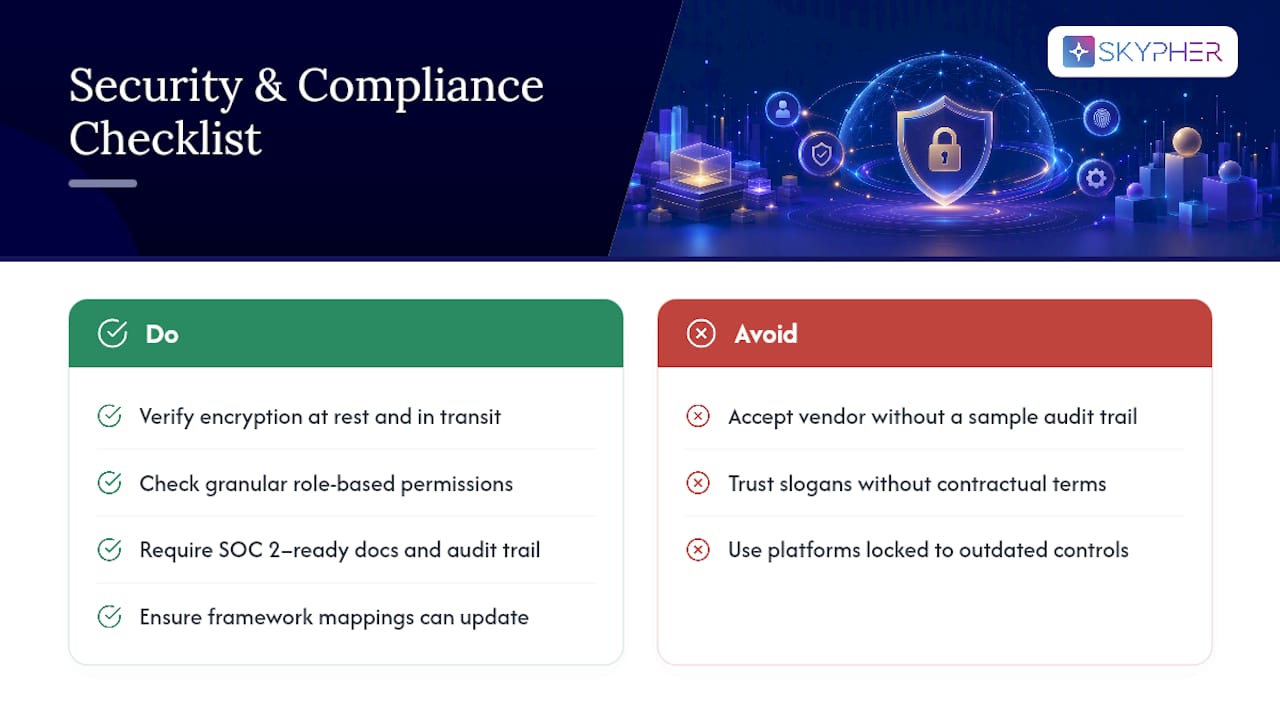
That starts with encryption and access controls on the platform itself, since you're feeding it your SOC 2 report, penetration test summaries, and internal policies. Ask vendors directly how they encrypt data at rest and in transit, and how granular their access permissions are for different team roles. A tool that reviews privacy practices in AI platforms, like AmmarAI's approach to content control, is worth studying for what "your content stays yours" should actually mean contractually, not just as a slogan.
Compliance-wise, the platform needs framework fluency across whichever standards your buyers ask about, plus the flexibility to update mappings as frameworks evolve. SOC 2 and ISO 27001 requirements shift periodically, and a platform locked into last year's control language will quietly generate outdated answers.
Documentation practices matter just as much as the software. Proper data security and encryption documentation that's SOC 2 ready gives your own team, and the automation platform, a clean source of truth to draft from. Role-based approval workflows and full audit logging round out the requirement list. If a vendor can't show you a sample audit trail during evaluation, that's a real gap, not an oversight.
Criteria for Evaluating and Selecting a Vendor
Start evaluation with the knowledge base architecture, not the AI model. Ask exactly how the platform ingests and refreshes documentation, and how quickly a policy update propagates into future answers. A vendor that can't answer this clearly is selling you a chatbot, not a compliance tool.
Next, test format range in the demo itself. Bring your own real questionnaire, in whatever format your buyers actually send, whether that's a native Excel workbook or a portal export from a TPRM platform. Watch how the system handles it, not a cleaned-up sample file the sales team prepared.
Push on integration depth. A platform advertising "40+ integrations" should demonstrate two or three that matter to your stack live, not just list logos on a slide. Confirm SSO support if your organization requires it for any third-party tool touching sensitive documentation.
Finally, weigh the human workflow as heavily as the AI quality. Ask how SME routing is configured, whether approval chains can mirror your existing org chart, and what the audit trail looks like six months into use. Reading a security software review focused on questionnaire automation before your first vendor call gives you a stronger baseline for comparison than any single sales demo will.
Getting Your Team to Actually Adopt the New System
The best automation platform fails quietly if your team keeps answering questionnaires the old way out of habit. Training needs to start with the people who'll spend the most time in the tool, usually your security and sales engineering leads, not a company-wide rollout email.
Run a short structured session showing exactly how confidence scores work and what a low-confidence flag means for their review responsibility. People trust systems they understand; a black box, even an accurate one, breeds workarounds.
Assign explicit ownership early. Someone needs to own the knowledge base itself, someone needs to own SME routing rules, and someone needs to own the quarterly audit. Without named owners, "the AI handles it" becomes an excuse for nobody checking anything, which is exactly the failure mode that undermines defensibility.
Build in a feedback channel from day one, whether that's a Slack thread or a MS Teams channel, where SMEs flag bad drafts immediately rather than quietly fixing them and moving on. Those flags are the raw material for improving your source documents. Reviewing security review best practices with your team during onboarding helps frame the shift as a workflow upgrade rather than a threat to their expertise.
Metrics to Track After You Go Live
Ongoing performance monitoring should center on four numbers, tracked monthly rather than left to an annual review.
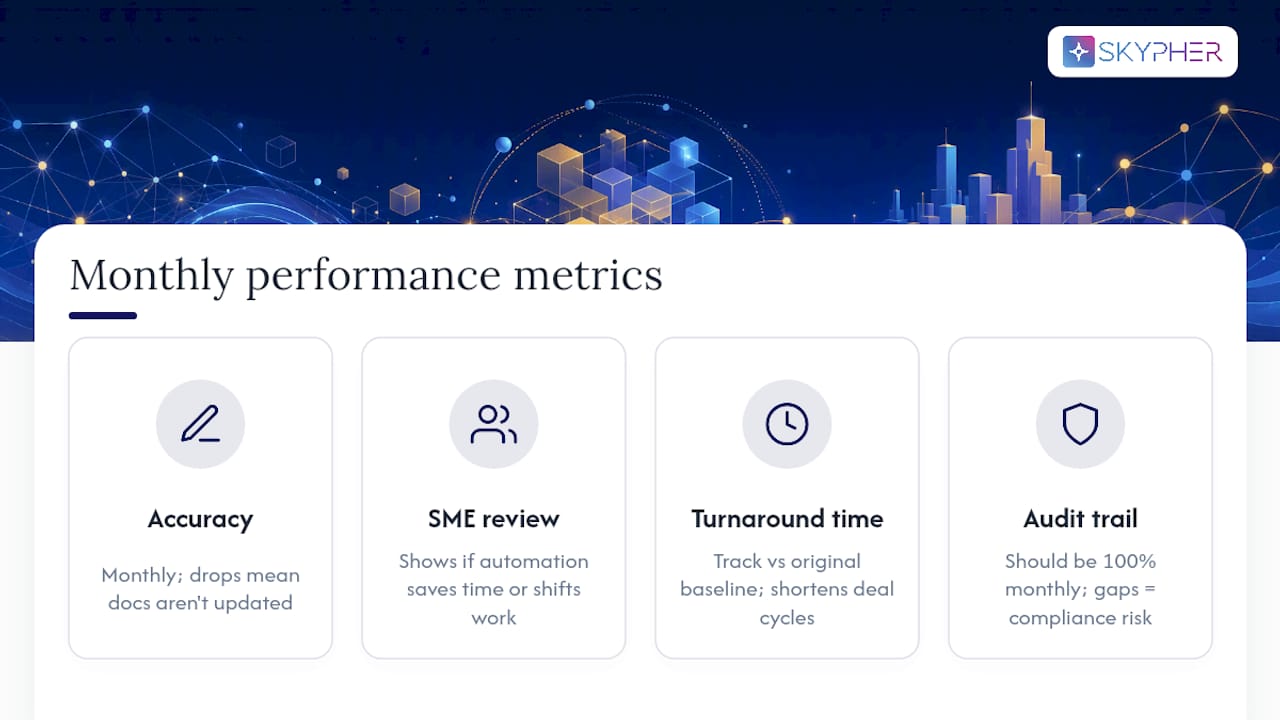
First-draft accuracy tells you whether the knowledge base is staying current. A downward trend usually means documentation updates aren't reaching the system fast enough, not that the AI has gotten worse.
SME review hours per questionnaire shows whether the automation is actually saving time or just moving the work around. If review hours creep back up, check whether SMEs have started re-verifying everything out of distrust, which points to a confidence-scoring calibration problem.
Turnaround time matters directly to sales, since a faster questionnaire response often shortens deal cycles. Track it against your original baseline, not against an industry average that may not reflect your document volume.
Audit trail completeness should sit at 100 percent, always. Any gap here is a compliance finding waiting to happen, and it's the easiest metric to catch early if someone actually looks at it monthly instead of only during a real audit.
Author's Perspective: What Actually Trips Teams Up
The failure pattern I see repeated isn't bad AI. It's teams treating automation like a set-and-forget tool instead of a system that needs named owners and conservative early thresholds. Ingesting stale documents, under-resourcing SME review because the demo looked so fast, and ignoring the audit trail until an auditor asks for it, that's the real risk triangle.
Good governance is boring on purpose: pilot conservatively, track error patterns honestly, and put quarterly knowledge base reviews on the calendar before you need them.
— Gaspard
Why Skypher Fits the Safe Software Checklist
Some platforms are built around controls such as AI drafting anchored to a live knowledge base, confidence scoring with visible source attribution, and mandatory SME approval before anything reaches a buyer. That's not a bolt-on feature. It's the architecture.

For enterprise teams managing high questionnaire volume, Skypher connects with more than 40 TPRM and documentation platforms, integrates directly into Slack and MS Teams so reviewers can approve answers without leaving their existing workflow, and includes a customizable Trust Center that handles routine buyer questions before they ever become a formal questionnaire. Multilingual support and 24/7 enterprise support round out the setup for global teams running audits across regions.
If your team is answering 15 or more questionnaires a quarter, the fastest way to see whether this fits your process is to run one recent questionnaire through the AI-powered recommendation engine as a pilot. You can start that pilot or request a walkthrough directly on the security questionnaire automation product page.
Sources
The benchmarks and workflow standards in this guide draw from vendor-neutral analysis on what questionnaire automation does and doesn't do, implementation guidance on connecting live documentation and calibrating confidence thresholds, and a breakdown of cutting response time by up to 80 percent through full-workflow automation. Skypher's own data on AI-driven compliance outcomes supports the accuracy and time-savings figures cited throughout.
FAQ
What Does "Safe Software" Mean for Security Questionnaires?
It means AI-driven automation that drafts answers only from a live, versioned knowledge base, scores its own confidence, and routes anything uncertain to a named human reviewer before submission.
How Much Time Can Automation Realistically Save?
Most organizations pairing AI drafting with SME review see 70 to 80 percent reductions in completion time, turning multiday work into a few hours.
How Accurate Are AI-Generated First Drafts?
On standard formats with a current, well-organized knowledge base, accuracy runs 90 to 96 percent; rushed setups can fall below 60 percent in the first month.
What's the Biggest Risk in Automating Questionnaire Responses?
Stale source documents and skipped SME review, both of which confidence scoring and mandatory approval gating, features built into platforms like Skypher, are designed to catch.
How Long Does a Pilot Typically Take?
A focused pilot runs about two weeks: four days connecting core documents, roughly a week configuring framework mappings and routing, then a week running a real questionnaire to calibrate thresholds.
Does Automation Replace Subject Matter Experts?
No. It shifts SME time away from routine, repeated answers and toward genuinely novel or low-confidence questions, which is where their judgment adds the most value.