

TL;DR:
- Security automation testing verifies that security controls effectively defend against cyber threats through continuous, automated checks. Implementing a tiered workflow with human oversight enhances coverage and reduces false positives, ensuring reliable security validation. Regular measurement of key performance indicators guides ongoing improvements and maintains strong, defensible security posture.
Security automation testing and validation is the practice of automatically verifying that security controls and procedures effectively defend against cyber threats, providing continuous assurance beyond periodic manual checks. For security professionals and QA teams in tech and finance, manual testing alone no longer scales against the volume and speed of modern threats. 48% of global enterprises now deploy AI in Security Operations Centers to reduce analyst fatigue and handle increased incident volume. That number reflects a fundamental shift: automation is no longer optional for teams that need to maintain continuous coverage across complex environments. This guide covers the prerequisites, workflow design, common pitfalls, and measurement frameworks you need to build a program that actually works.
What is security automation testing and validation?
Security automation testing and validation combines two distinct but connected practices. Automated security testing uses tools to scan code, infrastructure, and running applications for vulnerabilities without manual intervention. Validation of security systems then confirms those controls actually stop real attacks, not just that they exist on paper.

The distinction matters. A firewall rule can be configured correctly and still fail to block a specific attack pattern. Automated testing finds the misconfiguration. Validation confirms whether the control performs under realistic conditions. Teams that conflate the two end up with scan reports that look clean while actual defenses remain untested.
Recognized frameworks reinforce this separation. The OWASP Autonomous Penetration Testing Standard defines governance domains including scope enforcement, safety controls, human oversight, and auditability as requirements for any autonomous testing platform. That framework exists precisely because running automated tests without governance creates its own risks.
What are the prerequisites and tools for automated security testing?
The most common mistake teams make is automating complex processes before documenting and standardizing the manual workflows first. Rushing automation without a stable baseline produces fragile, unreliable results. Before you write a single automation script, every manual test case needs a documented, repeatable procedure.
Core tool categories to understand
The main categories of automated security testing tools each serve a specific function:
- SAST (Static Application Security Testing): Scans source code for vulnerabilities before the application runs. Best used on every code commit.
- DAST (Dynamic Application Security Testing): Tests running applications by simulating external attacks. Best used on build or staging environments.
- SCA (Software Composition Analysis): Identifies known vulnerabilities in open-source dependencies.
- BAS (Breach and Attack Simulation): Simulates real attack techniques against your environment to validate whether controls block them.
- ASV (Automated Security Validation): Continuously tests whether security controls perform as expected against current threat intelligence.
Infrastructure requirements matter too. You need API access to your CI/CD pipeline, a centralized logging system, and defined data retention policies before any of these tools can run reliably at scale.
Human oversight is non-negotiable
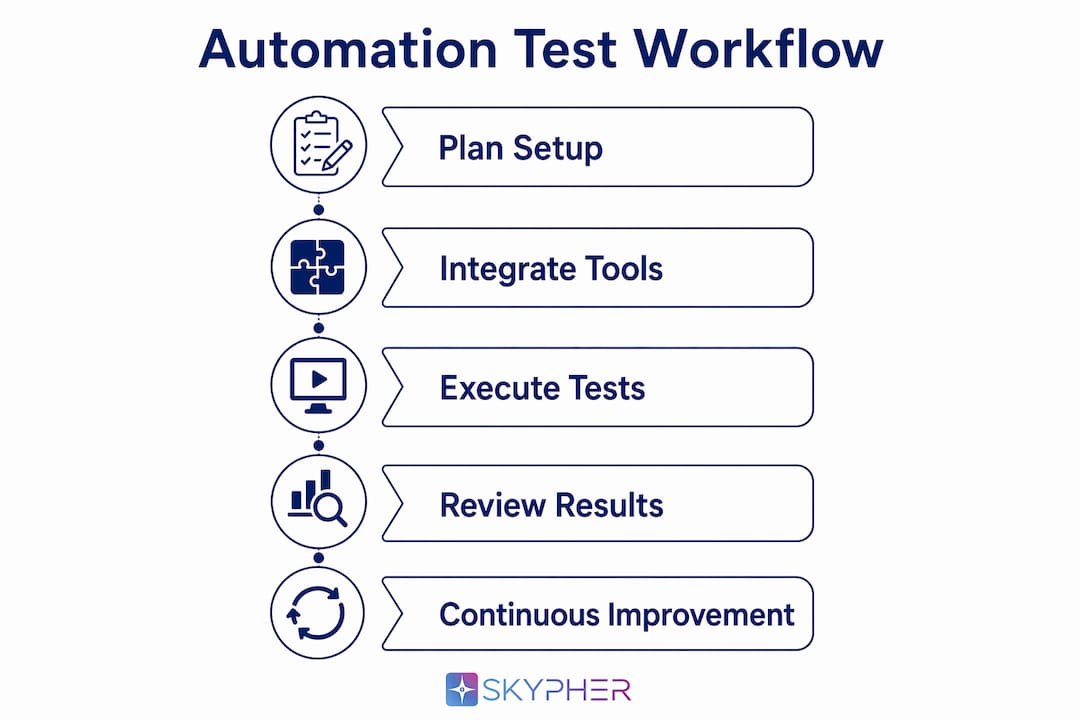
Human approval gates prevent automation from making irreversible changes without review. This is not a limitation of automation. It is a design requirement. Any workflow that can modify production configurations, block network traffic, or alter access controls needs a human checkpoint before execution.
The OWASP APTS standard includes 157+ requirements covering kill switches, audit trails, and graduated autonomy levels. Teams that skip these governance controls create liability, not efficiency.
Pro Tip: Before selecting any tool, map your existing manual test cases to the five tool categories above. Gaps in your manual coverage will become gaps in your automated coverage.
How to design and execute an effective security testing workflow
A tiered automation strategy is the most practical structure for most security teams. The principle is simple: run fast, low-impact tests early and often, then run intensive tests at later pipeline stages where the cost of a false positive is lower.
The four-stage tiered approach
- On every commit: Run SAST and SCA scans. These are fast, non-intrusive, and catch the majority of code-level vulnerabilities before they reach a build. Feedback reaches the developer within minutes.
- On every build: Run DAST against a staging environment. This stage tests the running application and catches issues that static analysis misses, such as authentication flaws and injection vulnerabilities in context.
- On a daily schedule: Run BAS and ASV tools against your production-equivalent environment. Continuous ASV and BAS on a daily or per-build cadence provides real-time validation of whether controls are working, not just whether they are configured.
- On a quarterly cycle: Combine automated findings with human-led penetration testing to cover business logic flaws and complex multi-step attack chains that automation cannot replicate.
Integrating into CI/CD for shift-left security
Embedding automated testing into CI/CD pipelines shifts security left, meaning developers catch issues at the point of creation rather than weeks later during a security review. The feedback loop is the key mechanism. When a developer gets a SAST alert within two minutes of a commit, they fix it in context. When the same alert arrives three weeks later in a ticket, the fix takes three times as long.
Pro Tip: Set severity thresholds in your CI/CD pipeline so only critical and high findings block a build. Medium and low findings should generate tickets, not pipeline failures. This prevents alert fatigue from killing adoption.
Triage and remediation workflow
| Stage | Action | Owner |
|---|---|---|
| Finding generated | Automated deduplication and severity scoring | Automation |
| Critical/High | Immediate ticket creation, human review within 24 hours | Security team |
| Medium/Low | Backlog ticket, addressed in next sprint | Development team |
| False positive confirmed | Suppression rule created, logic documented | Security team |
| Remediation complete | Automated retest confirms fix | Automation |
The feedback loop between security and development teams is what makes this sustainable. Security teams own the triage rules. Development teams own the fixes. Automation handles the repetitive verification work between those two human steps.
What challenges arise in security automation testing and validation?
Automation introduces its own category of risk. The most significant is the automation paradox: the more you automate, the more you depend on the automation being correct. A misconfigured scanner that marks critical vulnerabilities as low severity is worse than no scanner at all, because it creates false confidence.
Managing false positives and noise
Automated scanners generate high volumes of false positives without custom filtering. Teams that do not invest in context-aware risk scoring end up with analysts spending most of their time dismissing noise rather than fixing real issues. The solution is custom signal filtering tied to your specific environment, not the tool's default settings.
"Automation that produces more noise than signal does not reduce analyst workload. It redistributes it from finding vulnerabilities to managing alerts."
Limitations you must accept
Automated testing cannot replace manual testing for business logic flaws and complex multi-step attack chains. These require human creativity and contextual understanding that no current tool replicates. A scanner cannot know that your application's password reset flow can be abused to take over accounts through a sequence of five specific API calls. A skilled tester can.
The practical implication is that combining automated scanning with human validation produces better accuracy and coverage than either approach alone. Automation handles breadth. Human review handles depth.
Maintaining automation over time
Automation workflows degrade. Applications change, new endpoints appear, and detection logic that was accurate six months ago misses new attack patterns. Teams need a scheduled review cycle for their automation configurations, not just their findings. Treat your automation rules as code: version-controlled, reviewed, and updated on a regular cadence.
You can find a deeper look at common automation pitfalls and how to avoid them when building your documentation baseline.
How to measure and optimize your security automation program
Effective measurement starts with three core KPIs: vulnerability remediation speed, scanning coverage, and audit trail completeness. Tracking these metrics gives you the data to justify automation investments and identify where your program is underperforming.
Remediation speed measures the average time from finding to fix. Coverage measures what percentage of your attack surface is scanned on each cycle. Audit trail completeness measures whether every automated action is logged with enough context for a human reviewer to reconstruct what happened and why.
Aligning automation maturity to business needs
Not every organization needs the same level of automation maturity. A fintech firm processing payments needs daily BAS runs and real-time ASV coverage. A smaller SaaS company may get full value from SAST on commit and weekly DAST scans. The right level is the one that matches your threat model and regulatory requirements, not the most technically impressive option.
Regulatory alignment matters in finance specifically. Frameworks like SOC 2, ISO 27001, and PCI DSS all require evidence of continuous security monitoring. Automated tools generate that evidence as a byproduct of normal operation, which reduces the manual documentation burden at audit time. Teams that follow security review best practices for 2026 are already building this audit trail into their workflows.
Continuous tuning is the difference between an automation program that improves over time and one that stagnates. Review your detection logic quarterly. Update your remediation playbooks when new vulnerability classes emerge. Track false positive rates as a KPI and set a target reduction goal each quarter.
Key Takeaways
Effective security automation testing and validation requires a tiered strategy, stable manual baselines, human oversight gates, and continuous measurement to deliver sustained, defensible security coverage.
| Point | Details |
|---|---|
| Document manual workflows first | Automating unstable processes produces fragile, unreliable results that erode team trust. |
| Use a tiered testing cadence | Run SAST/SCA on commit, DAST on build, and BAS/ASV daily for continuous coverage. |
| Keep humans in the loop | Approval gates on high-impact actions prevent automation from causing business disruptions. |
| Invest in false positive filtering | Custom risk scoring keeps analyst focus on real threats, not scanner noise. |
| Measure three core KPIs | Track remediation speed, scanning coverage, and audit trail completeness to prove program value. |
What I've learned from watching automation programs succeed and fail
The teams I've seen get this right share one trait: they were disciplined about what they did not automate. Every successful program started with a short list of high-volume, well-understood manual tasks and automated those first. The teams that struggled tried to automate everything at once and ended up with a fragile system that nobody trusted.
The cultural factor is underrated. Automation changes who owns a problem. When a SAST scanner flags a vulnerability in a developer's commit, the developer now owns the first response. That is a real shift in accountability, and it creates friction if the security team does not invest in training and clear escalation paths. The best programs treat developer education as part of the automation rollout, not an afterthought.
The other thing I'd push back on is the idea that more automation always means better security. I've seen organizations with highly automated programs that had worse security posture than teams with simpler, more disciplined manual processes. Automation amplifies whatever process it runs on. If the underlying process is sound, automation makes it faster and more consistent. If the process is broken, automation just breaks things faster.
The security automation trends shaping 2026 point toward AI-assisted triage and autonomous validation becoming standard. That is genuinely useful. But the teams that will benefit most are the ones that already have clean, documented processes and clear human oversight structures in place. Automation is a force multiplier, not a foundation.
— Gaspard
How Skypher fits into your security validation workflow
Security questionnaires are one of the most time-consuming validation tasks security teams face. Every vendor assessment, customer due diligence request, and compliance review demands accurate, consistent answers drawn from your current security posture.

Skypher's AI Security Questionnaire Automation tool connects directly to your existing documentation in Confluence, Notion, Google Drive, SharePoint, and OneDrive, then answers security questionnaires with AI-driven accuracy. The platform integrates with over 40 third-party risk management platforms and can process 200 questions in under one minute. For security teams in tech and finance that need to automate security reviews without sacrificing accuracy, Skypher reduces response time while keeping your answers auditable and consistent across every review cycle.
FAQ
What is the difference between automated security testing and security validation?
Automated security testing scans for vulnerabilities in code, infrastructure, or running applications. Security validation confirms that existing controls actually block real attacks, not just that they are configured correctly.
How often should automated security validation tools run?
BAS and ASV tools should run on a daily or per-build schedule to provide real-time assurance. SAST and SCA scans should run on every code commit for the fastest developer feedback.
Can automation fully replace manual penetration testing?
No. Automated tools miss business logic flaws and complex multi-step attack chains that require human expertise. The most effective programs combine automated baseline scanning with periodic manual penetration testing.
What is the OWASP APTS standard?
The OWASP Autonomous Penetration Testing Standard defines governance requirements for autonomous testing platforms, including scope enforcement, kill switches, audit trails, and graduated autonomy levels, covering 157+ specific requirements.
What KPIs should I track for my security automation program?
Track vulnerability remediation speed, scanning coverage across your attack surface, and audit trail completeness. These three metrics give you the data to improve the program and demonstrate its value to stakeholders.