

A security platform that holds your questionnaires, evidence and customer-facing answers should sit behind your identity provider (IdP), the central service that signs users in. The integration comes down to five decisions: which protocol to use, which values to exchange, how to map users and roles, how to test before release, and how to keep the single sign-on layer from becoming a single point of failure. This guide covers each in the order you will meet them. It is written for CISOs, GRC and compliance leads, solution engineers and sales directors who will own or approve the rollout. We built Skypher for teams that handle high volumes of security questionnaires, and the platform supports SSO protocols so that its unlimited collaborators can sign in through the identity system you already govern.
TL;DR
- SSO means users authenticate once with a central IdP and every connected app trusts the result. Authentication is centralized, but what a user may do still has to be controlled inside each application.
- Choose OpenID Connect (OIDC) for new, modern integrations and SAML 2.0 where your enterprise estate already depends on it. Many IdPs support both.
- Configuration is a metadata exchange: endpoints, an issuer or entity ID, and a signing certificate for SAML; a redirect URL, client ID, client secret and issuer URL for OIDC.
- Pilot with a small group, test with a non-admin account, keep a recovery admin, and add SCIM provisioning so that deactivating a user also ends their open sessions.
- Plan for the failure case: CISA warns that SSO can be a single point of failure, so build in redundancy and session limits.
Table of Contents
- What SSO actually does inside a security platform
- Choosing between SAML 2.0 and OpenID Connect
- Before you configure: inventory what each side supports
- Configuring the platform and the IdP
- Mapping users, groups and roles
- Testing and rolling out in stages
- Keeping the integration secure
- What this means for a questionnaire platform
- Our perspective
- FAQ
- Sources
What SSO actually does inside a security platform
SSO lets a user authenticate once with a central IdP and then reach connected applications without a separate login for each. As Okta's developer documentation puts it, the IdP handles authentication, and each connected app grants access after the user has signed in there.
Two terms matter for the rest of this guide. The identity provider is the system that verifies the user (your directory-backed login service). The service provider is the application being accessed, here your security platform.
The most common flow is service-provider-initiated. The user opens the app, is redirected to the SSO service, authenticates, and returns to the app carrying a signed assertion. The U.S. government's Enterprise Single Sign-On Playbook (version 1.3, March 18, 2026) describes exactly this pattern and prefers it in Zero Trust environments because it supports secure deep-linking: a user who clicks a link to a specific record lands on that record after login.
For a security platform the stakes are higher than for a typical SaaS tool. These systems hold answers about your controls, audit evidence and customer commitments. Tying access to the same identity lifecycle as your HR and directory systems means a leaver loses access when they lose everything else.
Choosing between SAML 2.0 and OpenID Connect
You will usually pick a protocol per integration, and the choice rarely needs to be agonizing.
| SAML 2.0 | OpenID Connect (OIDC) | |
|---|---|---|
| Typical fit | Traditional web apps, rich user attributes, established enterprise estates | Modern web, mobile and API-driven apps |
| Build effort | Heavier XML-based metadata exchange | Usually simpler with modern frameworks |
| Enterprise reach | Very broad compatibility | Broad and growing |
| Setup values | SSO URL, issuer/entity ID, signing certificate or metadata URL | Client ID, client secret, issuer URL, redirect URL |
The split in the table follows Microsoft Learn's SSO overview: OIDC is usually simpler for software vendors to build with modern frameworks, while SAML offers broader enterprise compatibility, and the right choice depends on the app's authentication model. Okta recommends OIDC for new application integrations and supports both protocols for federated SSO.
A practical rule: if your IdP and the platform both support both protocols, default to OIDC for a new rollout. Keep SAML where your identity team already runs a mature SAML configuration, audit trail and certificate-rotation routine. Consistency across your estate often matters more than the protocol's theoretical elegance.
Before you configure: inventory what each side supports
The IDManagement playbook recommends an inventory of supported protocols, attributes and provisioning capabilities before any integration starts. For a security platform, a one-page checklist is enough:
- Protocols: SAML 2.0, OIDC or both, and whether login can start from the app (service-provider-initiated) as well as from the IdP portal.
- Attributes: which user fields the platform needs, typically email, name and a group or role claim.
- Provisioning: whether accounts are created at first sign-in (just-in-time) or managed through SCIM.
- Ownership: who in the identity team holds the IdP side, who in GRC or security holds the application side, and who approves role mappings.
- Break-glass access: which account can still sign in if SSO is misconfigured.
If you are mapping SSO into a wider set of tools, our enterprise security tool stack integration guide covers how the pieces fit together, and our SSO authentication guide for IT professionals goes deeper on the fundamentals.
Configuring the platform and the IdP
Configuration is a two-way exchange of trust details. The playbook notes that SAML setups typically swap metadata containing cryptographic keys and service endpoints, while OIDC commonly relies on discovery endpoints and dynamic registration, with requested scopes where needed.
SAML 2.0 setup
- Confirm the IdP conforms to SAML 2.0. This is the baseline requirement in Cloudflare's generic SAML guide.
- Collect three core values from the IdP: the SSO URL, the issuer or entity ID, and the signing certificate (or a metadata URL that carries it). Okta's external SAML IdP guide names the same three.
- Enter them in the platform's SSO settings, then copy the platform's own entity ID and assertion consumer URL back into the IdP.
- Check that the platform can verify the signature. The IdP's signing public key must be available to validate each response; this is what stops a forged assertion from being accepted.
- Confirm support for login that starts at the app. Okta notes that service-provider-initiated SAML is required for its external-IdP integration pattern.
OIDC setup
- Register a web application at the IdP using the Authorization Code flow, as Stytch's provider-setup documentation instructs.
- Enter the platform's redirect URL in that registration.
- Copy the client ID, client secret and issuer URL back into the platform.
- Request only the scopes you need, which keeps the data released to the application minimal.
The usual failure points are mundane: a redirect URL that differs by a trailing slash, an expired or rotated certificate that was never updated on the other side, and a clock mismatch that invalidates assertions. Write the certificate's expiry date into your calendar the day you configure it.
Mapping users, groups and roles
Getting people signed in is the easy half. The harder half is deciding what each person can do once they arrive.
The IDManagement playbook advises documenting each application's attribute requirements and releasing only the data the application needs, before you configure provisioning or authorization. Just-in-time (JIT) creation can work from OIDC claims or SAML attributes, and SCIM, a standard protocol for automated account management, handles the full lifecycle.
Three mapping decisions deserve a written answer:
- Username matching. Okta's guide describes matching the username in the assertion to the application's username, with an optional regular-expression filter. For B2B and multi-tenant setups it recommends scoping users, for example by email suffix, so only your domain's accounts match.
- Role assignment. Decide whether roles come from IdP groups or are set inside the platform. Reviewers, approvers and read-only sales users usually need different rights over the same answer library.
- Least privilege. Start every new user at the lowest role that lets them work, and elevate by request.
When SCIM is worth it
SSO alone does not manage accounts. In Popsink's SSO and SCIM documentation, SSO creates an account at first sign-in but may still require an organization invitation, whereas SCIM can create accounts, update profiles, deactivate users and sync groups to roles. The same documentation draws the line that matters most for security teams: without SCIM, disabling a user blocks their next sign-in but an already-open session stays valid until it expires. With SCIM, deactivation revokes open sessions immediately.
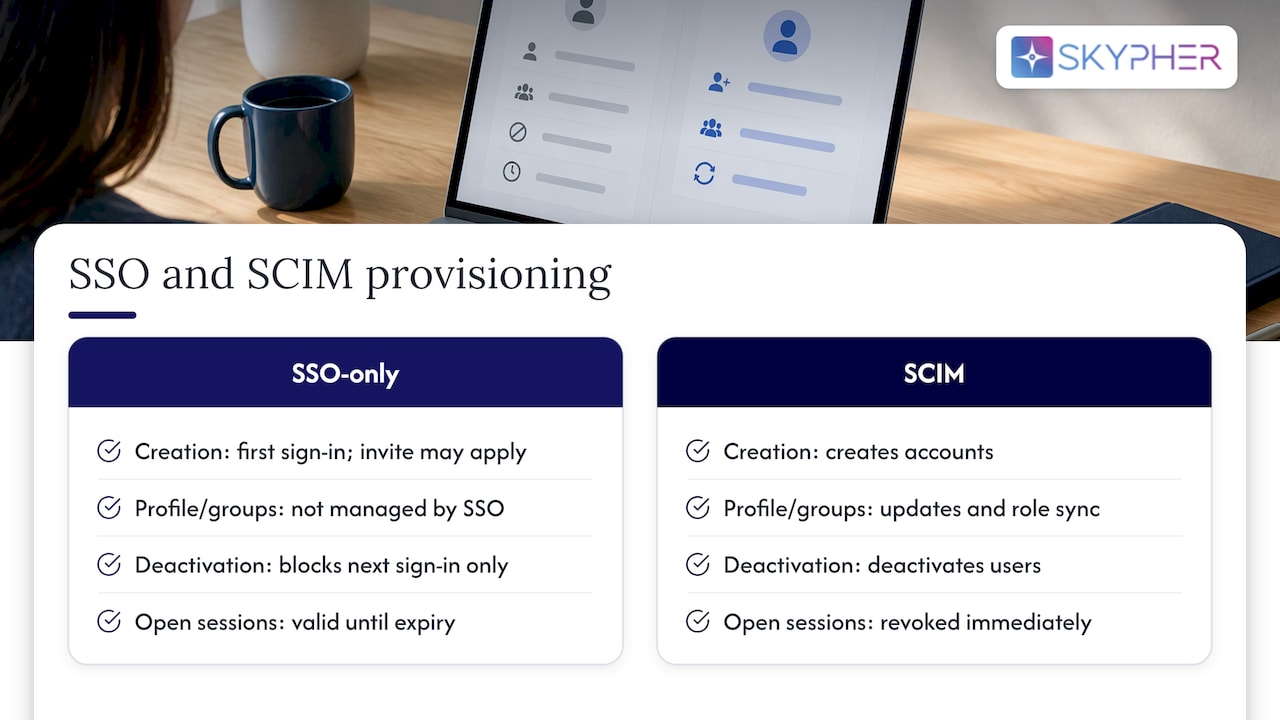
If your auditors ask how quickly a leaver's access disappears, that difference is your answer. Our guide to user provisioning for IT teams explains the lifecycle in more detail.
Testing and rolling out in stages
The playbook's recommendation is to configure, test and release SSO features to users, organizing application integrations into pilots and production releases. In practice:
- Pilot with a small group. Ryu's enterprise identity guide suggests starting SCIM with a small assigned group and verifying create, update, deactivate and remove behavior before assigning the full directory.
- Keep a recovery admin. The same guide recommends retaining a working recovery admin until the first SSO login has succeeded, so a bad certificate cannot lock everyone out.
- Test as an ordinary user. Bland's SSO support guide recommends a non-admin account in an incognito session, since admin accounts and cached sessions can mask problems.
- Read the IdP audit logs when something fails. Then verify callback URLs, certificates or client secrets, and attribute mappings, in that order.
- Test the leaver path, not just the joiner path. Remove a pilot user and confirm access ends. Teams that want repeatable, documented runs of this kind of check can look at testing in isolated environments as a pattern for recording results without touching production.
- Release in waves by team or region, and keep a rollback plan for each wave.
Keeping the integration secure
SSO concentrates risk as well as convenience. The IDManagement playbook lists the exposures: signing-key compromise, session risks, weak assertion validation, injection and replay. Its recommended controls are phishing-resistant multi-factor authentication (MFA), least privilege, protected signing keys and assertion-bearing cookies, validation that assertions come from a trusted source for your application, and monitoring of authentication events with centralized login logging.
CISA's Hybrid Identity Solutions Guidance adds that SSO can be a single point of failure. It recommends mitigating that, considering session-length limits, and evaluating vendors' evidence of SSO best practices and least privilege. CISA's Identity and Access Management best practices (2023) goes further on availability: plan high availability for SSO, including local and regional geographic redundancy, because an SSO failure can remove access to every connected system.
Two more habits pay off:
- Treat provisioning tokens as administrative secrets. In Ryu's documentation, SCIM tokens are scoped to the organization, stored hashed, shown only on creation or rotation, and limited to owners and admins, because a token can remove members.
- Do not confuse sign-in with permission. Cloudflare's SSO overview stresses that SSO should be combined with access controls, permission controls and activity logs, since authentication alone does not govern what a signed-in user may do. CrowdStrike's overview likewise advises pairing SSO with MFA and context-aware access. Our comparison of SSO and MFA for IT security teams shows how the two layers divide the work.
What this means for a questionnaire platform
Security questionnaires are a team sport. Security engineers draft answers, GRC reviews them, legal checks commitments, and sales and solution engineers send them to prospects. That is many people with different roles touching sensitive content, which is exactly where central identity control earns its keep.
Skypher is an AI-powered platform for answering security questionnaires. It supports SSO protocols, offers real-time collaboration with unlimited users, and connects with Slack, Microsoft Teams, Confluence, Notion, Google Drive, OneDrive and SharePoint, so the people who hold the answers can work where they already are. The platform also offers 24/7 enterprise support, which is useful when a rollout spans time zones. The setup principles above apply directly: inventory first, map roles to least privilege, pilot, then release.
If you are evaluating how a questionnaire workflow would sit behind your identity provider, we can walk through it with you. You can see the Skypher Questionnaire Automation Tool and its pricing options, or review how the Trust Center lets customers see your security posture without a separate request cycle.

The Trust Center is a customizable, customer-facing page, so the same evidence your team keeps behind SSO can be shared deliberately with the buyers who need it. For diligence questionnaires in finance, see our DDQ automation.
Our perspective
We think of SSO as the front door of a trust program, not a checkbox on a procurement form. When a customer sends a questionnaire, one of the first questions is how you control access to systems that hold sensitive information. A clean answer, with SSO, role-based access and fast deprovisioning, shortens the conversation.
That is why we build around the way security, GRC and sales teams actually work together. Many people contribute to a single answer, and no one should need a separate password to do it. Unlimited collaborators, real-time editing and integrations with the tools your team already uses only make sense when identity is managed in one place.
Our advice is to treat the integration as a small project with an owner, a pilot and a written role map. Do the inventory, protect the signing keys, plan for the day the IdP is unavailable, and review access when roles change. Teams that do this find that the questionnaire process becomes calmer, because the question of who can see and approve what already has an answer.
Gaspard
FAQ
Can LDAP be used for SSO?
LDAP is a directory protocol, so it commonly sits behind the IdP as the store of users and groups rather than acting as the SSO mechanism itself. Your IdP reads the directory, then issues SAML or OIDC assertions to applications. For a security platform, you configure SAML or OIDC against the IdP and let the directory feed it.
Is SSO enough to secure access to a security platform?
SSO centralizes authentication, but it does not decide what a user may do after signing in. Combine it with phishing-resistant MFA, role-based permissions inside the application and activity logging, as the IDManagement playbook and CISA guidance recommend. Together these cover both identity and authorization.
Should we use SAML or OIDC?
Choose OIDC for new integrations when both sides support it, since it is usually simpler to build and maintain. Choose SAML when your estate already runs on it and your identity team has a working process for certificates and attributes. Either works well when it is configured and monitored carefully.
Do we need SCIM if SSO already works?
SCIM is worth adding when you want accounts created, updated and removed automatically from your directory. Without it, disabling a user blocks the next sign-in but an open session can remain valid until it expires. With it, deactivation can end sessions immediately.
How long should an SSO rollout take?
The time depends on your IdP, the number of roles and how many teams join. A staged approach works best: a pilot group, a verified joiner-mover-leaver test, then release in waves. Keep a recovery admin account in place until the first SSO login has succeeded.
Sources
- Single Sign-On overview, Okta Developer
- Enterprise Single Sign-On Playbook, IDManagement
- What is single sign-on in Microsoft Entra ID, Microsoft Learn
- Generic SAML 2.0, Cloudflare Docs
- Enterprise identity provider, Okta Developer
- SSO Provider Setup, Stytch
- Single sign-on (SSO) and SCIM, Popsink
- Enterprise identity, Ryu docs
- SSO Support, Bland docs
- Hybrid Identity Solutions Guidance, CISA
- Identity and Access Management Recommended Best Practices, CISA
- What Is Single Sign-On (SSO)?, CrowdStrike
- What is SSO?, Cloudflare
- Security for your backup tests, RestoreTrust